Description
n8n-nodes-openinbox


This is an n8n community node for OpenInbox — a disposable / temporary email API. Use it to programmatically create inboxes, read incoming emails, and trigger workflows the moment an email lands.
> OpenInbox is receive-only disposable email infrastructure. You can create inboxes on demand, list received messages, and subscribe to webhook events such as email.received.
Use Cases
- OTP & verification automation — Create a disposable inbox, trigger a signup flow, and extract the 6-digit code automatically.
- Email integration testing — Test your transactional email pipelines without polluting real inboxes.
- Signup flow QA — Spin up a fresh inbox per test run and verify confirmation emails end-to-end.
- OpenInbox — REST operations against the OpenInbox API.
- OpenInbox Trigger — Fires when an OpenInbox webhook event is delivered.
- API Key — generate one from your OpenInbox dashboard at https://openinbox.io. API access is available on Pro, Business, and 7-Day Pass tiers. Pro plan includes a 7-day free trial — start free at openinbox.io.
Example Workflow
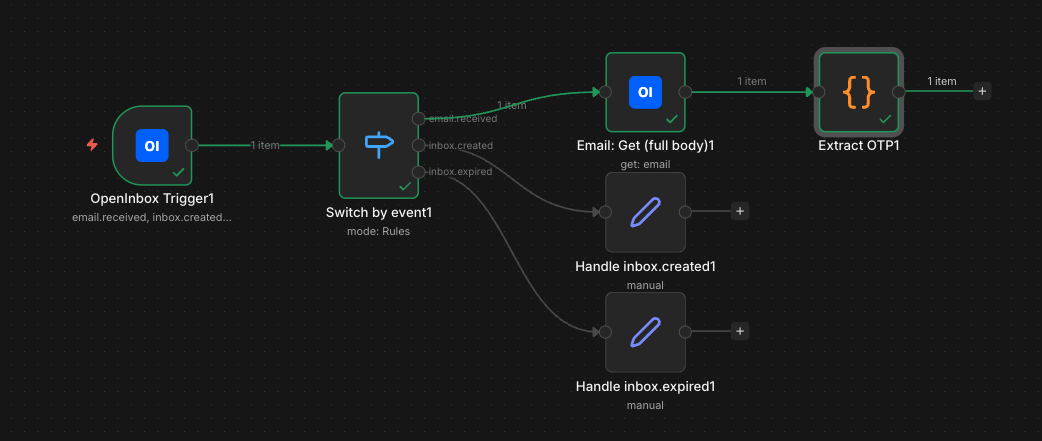
The repo ships with a complete demo workflow that:
1. Listens for OpenInbox webhook deliveries (email.received, inbox.created, inbox.expired).
2. Verifies the X-Webhook-Signature HMAC.
3. Routes by event with a Switch node.
4. On email.received, pulls the full email body and extracts a 6-digit OTP.
!OpenInbox n8n example workflow
Import examples/openinbox-full-demo.workflow.json into n8n to try it.
Installation
n8n Cloud (verified node): Search for OpenInbox directly in the node picker on the canvas — no settings required. Just drag it into your workflow.
Self-hosted / manual:
1. Go to Settings → Community Nodes.
2. Click Install.
3. Enter n8n-nodes-openinbox and confirm.
4. Make sure Verified Community Nodes is enabled in your Admin Panel (you may need to restart your instance).
After installation, two nodes become available:
Credentials
Create an OpenInbox API credential and set:
The key is sent as the X-API-Key request header.
Operations
Inbox
| Operation | HTTP | Endpoint | Description |
| ——— | ——– | ————————– | ————————————————————————————– |
| Create | POST | /api/v1/inboxes | Create a new disposable inbox. Optional prefix to control the local-part. |
| Get | GET | /api/v1/inboxes/:inboxId | Fetch an inbox by ID, including emailCount and isExpired. |
| Get Many | GET | /api/v1/inboxes | List inboxes with limit/offset pagination. Toggle Return All to auto-paginate. |
| Delete | DELETE | /api/v1/inboxes/:inboxId | Permanently delete an inbox and all its emails. |
| Operation | HTTP | Endpoint | Description |
| ——— | ——– | ——————————— | —————————————————— |
| Get Many | GET | /api/v1/inboxes/:inboxId/emails | List emails in an inbox. Optional unreadOnly filter. |
| Get | GET | /api/v1/emails/:emailId | Fetch a single email (auto-marks as read). |
| Delete | DELETE | /api/v1/emails/:emailId | Permanently delete an email. |
Webhook
| Operation | HTTP | Endpoint | Description |
| ——— | ——– | —————————– | —————————————— |
| Create | POST | /api/v1/webhooks | Register a webhook for one or more events. |
| Get Many | GET | /api/v1/webhooks | List all webhooks on the account. |
| Delete | DELETE | /api/v1/webhooks/:webhookId | Remove a webhook subscription. |
Account
| Operation | HTTP | Endpoint | Description |
| ——— | —– | —————– | —————————————- |
| Get | GET | /api/v1/account | Get tier, rate limits and current usage. |
Trigger Node
The OpenInbox Trigger automatically registers a webhook with OpenInbox when the workflow activates and removes it when the workflow deactivates.
Setup
1. Add an OpenInbox Trigger node to your workflow.
2. Select the OpenInbox API credential.
3. Choose one or more events:
– email.received — fires for every email delivered to any of your inboxes.
– inbox.created
– inbox.expired
4. Activate the workflow. n8n will call POST /api/v1/webhooks with the workflow’s public webhook URL. Deactivating calls DELETE /api/v1/webhooks/:id.
Payload
OpenInbox delivers JSON like this:
{
  "event": "email.received",
  "timestamp": "2026-04-26T12:00:00Z",
  "data": {
    "emailId": "uuid",
    "inboxId": "uuid",
    "from": "sender@example.com",
    "subject": "Hello!"
  }
}
The trigger forwards this body verbatim, plus a __delivery object containing the X-Webhook-Signature, X-Webhook-Event, and X-Webhook-Delivery headers so you can verify the HMAC-SHA256 signature against your webhook secret.
Signature Format
X-Webhook-Signature: t=,v1=
To verify: HMAC_SHA256(secret, ".
Compatibility
>= 1.0>= 18.10Resources
License
MIT — see LICENSE.md.