Description
@t0mer/n8n-nodes-ssllabs


An n8n community node for the Qualys SSL Labs API v4. It runs SSL/TLS server assessments, returns grades, endpoint details and certificate data, and watches your hosts for grade or certificate changes.
It ships two nodes and one credential:
| | |
|—|—|
| SSL Labs | Action node: run assessments, read endpoint details, get service info, and register your email. It can also be used as a tool by an n8n AI Agent. |
| SSL Labs Trigger | Polling trigger: grade changed, grade below a threshold, or certificate expiring |
| SSL Labs API | Credential: your registered email address and the API base URL |
> Unofficial. Not affiliated with, endorsed by, or supported by Qualys. This is a community-maintained node. SSL Labs is a free service provided by Qualys; use it according to the SSL Labs terms and conditions. Only assess hosts you own or are authorized to test. See Terms of use and privacy.
- Demo
- Installation
- Registration
- Credentials
- SSL Labs node
- SSL Labs Trigger
- Example workflows
- Rate limits and timing
- Terms of use and privacy
- Security notes
- Compatibility
- Development
- Contributing
- Resources
- License
- the credential
- a free-mailbox registration being rejected (email addresses are blurred)
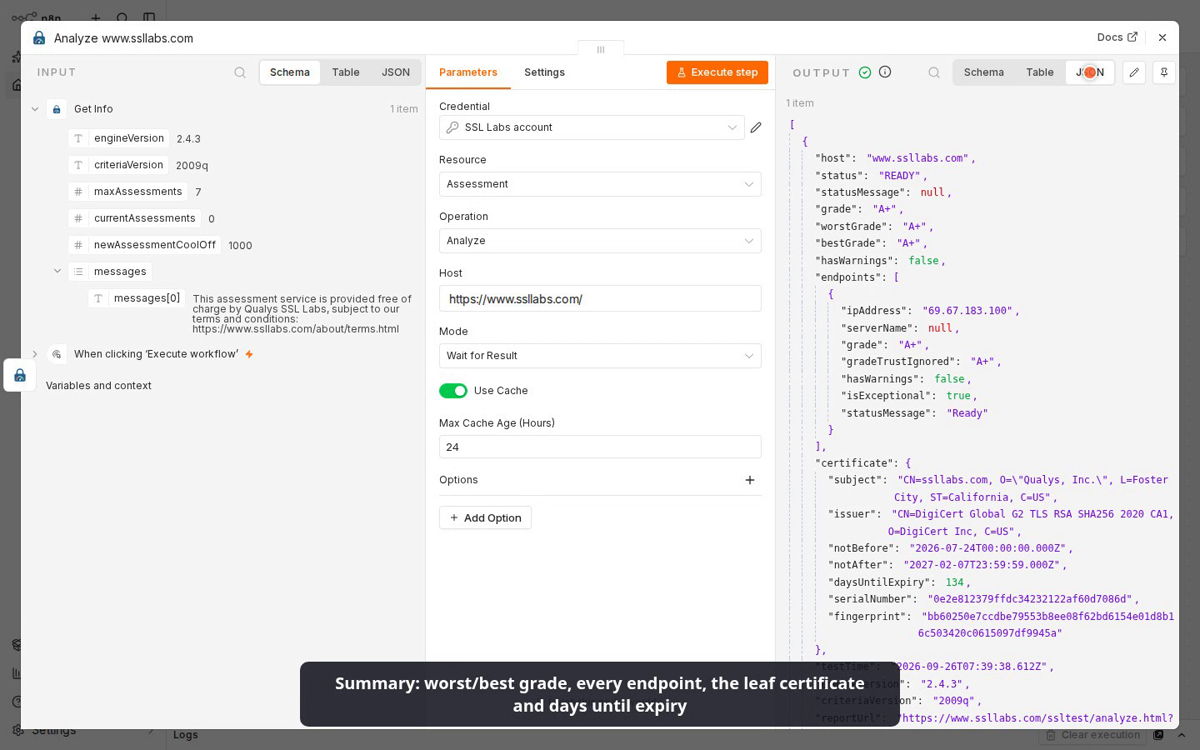
- Get Info, then Analyze of
www.ssllabs.com, with cache on and publish off - the trigger’s Fetch Test Event
Demo

▶️ Watch the demo video (2½ min). It shows:
Installation
From the n8n UI (self-hosted): go to Settings → Community Nodes → Install, enter @t0mer/n8n-nodes-ssllabs, and confirm.
Manually from npm, in your n8n custom nodes folder (usually ~/.n8n/nodes):
mkdir -p ~/.n8n/nodes && cd ~/.n8n/nodes
npm install @t0mer/n8n-nodes-ssllabs
Then restart n8n. See the community nodes installation guide for details, including installs in Docker.
Registration
API v4 requires every caller to register an email address once. Qualys rejects free mailbox domains such as Gmail, Yahoo or Hotmail, so use an organization address.
You can register in either of two ways:
email: …. If SSL Labs answers with HTTP 200 but a failure status, the node fails with “SSL Labs registration failed: …” and the reason.ssllabs-scan-v4-register from the ssllabs-scan repository. Its README lists the flags it takes.You only register once per email address.
Credentials
Create an SSL Labs API credential:
| Field | Default | Description |
|—|—|—|
| Email | — (required) | The address you registered. It is sent as the email header on every call. |
| Base URL | https://api.ssllabs.com/api/v4 | Use an https:// URL. The node’s operations and the trigger refuse any other URL with “Base URL must start with https://”, but the credential test does not check it: an http:// URL would be tested over cleartext, with your email in the header. Use https://api.dev.ssllabs.com/api/v4 for the development server, which has lower limits and no availability guarantee. |
The credential test calls /info, so it only proves that the API is reachable. An unregistered email fails on the first assessment with “Email is not registered with SSL Labs v4 — use the Register operation first”.
SSL Labs node
| Resource | Operations |
|—|—|
| Assessment | Analyze |
| Endpoint | Get |
| Registration | Register |
| Service | Get Info, Get Root Certificates, Get Status Codes |
Assessment → Analyze
This operation assesses a host. The Host field takes a bare hostname; if you paste a URL such as https://Example.com:443/path, it is reduced to example.com. Input that leaves no valid hostname fails with “… is not a valid hostname”.
| Mode | What it does |
|—|—|
| Wait for Result (default) | Starts an assessment (or reuses a cached one) and polls until it is READY or ERROR, or the timeout passes. |
| Start Only | Starts the assessment and returns right away with its current status. Use it for long batches that you split across workflow runs. |
| Get Status | Makes a single call without forcing a new scan and returns the current state. Note that SSL Labs itself starts an assessment when nothing fresh enough is cached. |
Parameters
| Parameter | Default | Notes |
|—|—|—|
| Use Cache | on | Accept a cached report (fromCache=on). |
| Max Cache Age (Hours) | 24 | Only shown when Use Cache is on. Only accept cached reports up to this old. 0 accepts any age. |
| Force New Scan | off | Only shown when Use Cache is off and Mode is Wait for Result or Start Only. Sends startNew=on on the first call only, because repeating it while polling would restart the assessment. SSL Labs does not allow startNew and fromCache together, so the node never sends both. |
Options
| Option | Default | Notes |
|—|—|—|
| Batch Concurrency | 3 | Maximum parallel assessments when there are several input items (1–10). |
| Detail Level | Summary | Summary returns the compact shape below. Full returns the raw SSL Labs Host object plus reportUrl. |
| Fail on Assessment Error | on | When off, an assessment that ends in ERROR is returned as an item instead of failing the node with “Assessment of … failed: …”. |
| Ignore Certificate Mismatch | off | Continue even when the certificate does not match the hostname (ignoreMismatch=on). |
| Initial Poll Interval (Seconds) | 5 | Wait for Result only. How often to poll while the status is DNS (minimum 5). |
| Poll Interval (Seconds) | 10 | Wait for Result only. How often to poll once the status is IN_PROGRESS (minimum 5). |
| Publish Results | off | ⚠️ Published results appear on the public SSL Labs boards. Leave this off unless you really want that. |
| Timeout (Minutes) | 15 | Wait for Result only. How long to keep polling before failing with “Assessment of … did not finish within … minutes” (minimum 1). |
Summary output (one item per host):
{
  "host": "example.com",
  "status": "READY",
  "statusMessage": "Ready",
  "grade": "B",
  "worstGrade": "B",
  "bestGrade": "A+",
  "hasWarnings": true,
  "endpoints": [
    { "ipAddress": "93.184.216.34", "serverName": "example.com", "grade": "A+", "gradeTrustIgnored": "A+",
      "hasWarnings": false, "isExceptional": true, "statusMessage": "Ready" },
    { "ipAddress": "2606:2800:220:1:248:1893:25c8:1946", "serverName": "example.com", "grade": "B", "gradeTrustIgnored": "B",
      "hasWarnings": true, "isExceptional": false, "statusMessage": "Ready" }
  ],
  "certificate": {
    "subject": "CN=example.com", "issuer": "CN=R11, O=Let's Encrypt, C=US",
    "notBefore": "2026-08-27T00:00:00.000Z", "notAfter": "2026-11-26T01:00:00.000Z",
    "daysUntilExpiry": 61, "serialNumber": "04a1b2c3", "fingerprint": "…sha256…"
  },
  "testTime": "2026-09-25T23:59:50.000Z",
  "engineVersion": "2.3.1",
  "criteriaVersion": "2009q",
  "reportUrl": "https://www.ssllabs.com/ssltest/analyze.html?d=example.com"
}
A few details about these fields:
grade is the worst grade across all endpoints that have one. That makes it the conservative value to alert on. Endpoints that could not be tested have no grade and are ignored; when no endpoint has a grade, grade is null.hasWarnings is true when any endpoint has warnings.certificate is the leaf certificate: the first certificate chain leaf, across endpoints in order, that matches a certificate in the result. When none matches, it falls back to the first certificate. fingerprint is its SHA-256 hash (or SHA-1, serial number or ID when that is missing), and daysUntilExpiry is computed when the item is produced.A+ > A > A- > B > C > D > E > F > T > M. T (trust issues) and M (certificate name mismatch) rank below F.Several input items: the node reads /info once, then runs at most min(Batch Concurrency, maxAssessments − currentAssessments) assessments at a time, and never fewer than 1. It spaces new assessments by SSL Labs’ newAssessmentCoolOff plus a small margin (1.1 seconds when /info does not report one). If /info cannot be read, it runs one assessment at a time.
{ "error": "…", "host": "…" } and the other items keep going.Example: check your own hosts and alert if the grade is below A.
1. Schedule Trigger
2. SSL Labs (Assessment → Analyze, Host {{ $json.host }})
3. IF {{ $json.grade }} is not A+/A
4. Slack
Endpoint → Get
This operation returns the full SSL Labs Endpoint object for one IP address of an assessed host (getEndpointData). Set Host and IP Address; the IP address is listed in the endpoints of an Analyze result (brackets around an IPv6 address are removed). Use Cache (default on) returns the cached data. This operation never starts a new assessment.
Service
| Operation | Returns |
|—|—|
| Get Info | Availability, engine and criteria versions, maxAssessments, currentAssessments, newAssessmentCoolOff, and messages |
| Get Status Codes | The statusDetails code → English message map |
| Get Root Certificates | { trustStoreId, trustStore, certificates } where certificates is the raw PEM text. Choose the Trust Store: Mozilla (1, default), Apple MacOS (2), Android (3), Java (4) or Windows (5). |
Registration → Register
See Registration.
SSL Labs Trigger
The trigger polls SSL Labs on the schedule you set in n8n. It never waits for a scan during a poll: it reads cached results (fromCache=on, maxAge=) and picks up assessments that are still running on the next poll.
| Parameter | Default | Notes |
|—|—|—|
| Hosts | — | The hostnames to watch. Add one per value; comma- or space-separated values also work. URLs are reduced to their hostname, and duplicates are removed. An invalid hostname fails the poll. |
| Event | Grade Changed | See the table below. |
| Threshold Grade | A | For Grade Below Threshold. |
| Days Before Expiry | 21 | For Certificate Expiring. |
| Max Result Age (Hours) | 24 | Cached results up to this old are reused, so each host is re-assessed at most this often (minimum 1). |
| Emit Errors (option) | off | Emit an item with event: "assessmentError" when a host’s assessment ends in ERROR. |
| Event | Fires when |
|—|—|
| Grade Changed | A host’s grade differs from the last grade seen. The output includes previousGrade. A result without a grade does not count as a change. |
| Grade Below Threshold | The grade becomes worse than the threshold. It fires once when the grade crosses the threshold, and re-arms when the grade recovers. The output includes previousGrade and thresholdGrade. |
| Certificate Expiring | daysUntilExpiry is at or below the limit. It fires once per certificate, keyed on its fingerprint, and a renewed certificate re-arms it. The output includes previousCertificate when the certificate changed. |
Output items use the same Summary shape as the action node, plus an event field.
How the trigger behaves:
– A certificate that is already expiring at the baseline alerts on the next poll.
– A host that is already below the threshold does not alert, because it never crossed it. It alerts the next time it crosses after recovering.
– Grade Below Threshold starts tracking at the first graded result after the event or threshold is selected, so it also begins with a silent baseline.
– Grade Changed compares against the last grade seen, whichever event was selected at the time.
– Certificate Expiring alerts on the next poll for a certificate already inside the window, even right after you switch to this event.
event: "test", so you can map fields. It does not change the stored state. A host with no fresh cached result comes back with its in-progress status, because SSL Labs starts an assessment for it.notAfter date. – SSL Labs busy (429, 503 or 529): the poll stops quietly. The remaining hosts are checked first on the next poll.
– Server error or network trouble: that host is skipped until the next poll. If it happens for every host, the poll fails, since that usually means a wrong base URL or an outage.
– 400 for a host: recorded as that host’s error.
– Configuration problems (unregistered email, a non-https base URL, 401/403/404): the trigger fails, so you see the problem.
newAssessmentCoolOff plus a small margin (1.1 seconds by default) before checking the next host.stateVersion: 1).Example workflows
Import any of these from examples/ with Workflows → Import from File (or import from URL, using the file’s raw link). The hostnames are placeholders; replace them with hosts you own or are authorized to test, and register your email first (see Registration).
| File | What it does |
|—|—|
| weekly-ssl-grade-report.json | Every Monday, assesses a list of hosts and appends grades and certificate expiry dates to Google Sheets. It also emails a summary. |
| alert-on-grade-drop-or-expiring-certificate.json | Two triggers: send a Slack alert when a grade drops below A or a certificate expires within 21 days. |
| on-demand-scan-webhook.json | A webhook that returns the grade of a posted host, or the assessment’s progress so the caller can poll again. |
| ai-agent-ssl-tool.json | An AI Agent that uses the node as a tool to answer “what grade does my site get?” and “when does my certificate expire?” |
Rate limits and timing
maxAssessments) and how quickly you may start new ones (newAssessmentCoolOff). The node respects both.How the action node handles HTTP errors from SSL Labs:
| Status | Meaning | What the node does |
|—|—|—|
| 429 | Too many assessments | Retries up to 3 times, waiting about 15, 30 and 45 seconds |
| 503 | Maintenance | Retries twice, waiting about 1 and 2 minutes, then fails with a clear message. SSL Labs recommends waiting 15–30 minutes before trying again. |
| 529 | Overloaded | Same as 503 |
| 500 | Server error | Retried once after about 5 seconds. A call that started a new scan (startNew) is never repeated. |
| 400 | Invalid parameters | Not retried |
| 441 (or a 400 about the email) | Email not registered | Fails with “Email is not registered with SSL Labs v4 — use the Register operation first” |
Waits are randomized by ±25%. In Wait for Result mode, no retry wait runs past the timeout. The Register operation and the trigger do not retry.
Terms of use and privacy
Security notes
https:// Base URL. The node’s operations and the trigger refuse any other URL, but the credential test does not check it, so an http:// URL would send your email header in cleartext during the test.Compatibility
n8n-workflow 2.40Development
git clone https://github.com/t0mer/n8n-nodes-ssllabs.git
cd n8n-nodes-ssllabs
npm ci
npm run lint     # n8n-node lint
npm run build    # n8n-node build → dist/
npm test         # vitest, no calls to the real API
npm run dev      # starts a local n8n with the nodes loaded
CI (.github/workflows/ci.yml) runs lint, build and tests on Node 24, then runs the n8n Creator Portal scanner on the source and the packed tarball (scripts/scan-package.mjs). Releases are published to npm with provenance by .github/workflows/publish.yml when a YYYY.M.PATCH tag is pushed; see the changelog.
Project layout:
| Path | Contents |
|—|—|
| credentials/ | The SSL Labs API credential |
| nodes/SslLabs/ | The action node and one module per resource |
| nodes/SslLabsTrigger/ | The polling trigger and its stored state |
| shared/ | Transport and retries, polling, batching, hostname parsing, grades and the summary mapper |
| test/ | Vitest tests and API fixtures |
| examples/ | Importable example workflows |
Contributing
Issues and pull requests are welcome at github.com/t0mer/n8n-nodes-ssllabs. Please run npm run lint, npm run build and npm test before opening a pull request, and never point tests at the live SSL Labs API.
Resources
License
MIT © 2026 t0mer