Description
GPT Image by Ace Data Cloud — n8n community node
Generate and edit GPT Image visuals with reference images, size and quality controls, and asynchronous task tracking in n8n via AceDataCloud.
 
Package: @acedatacloud/n8n-nodes-gpt-image · License: MIT · Node: GPT Image by Ace Data Cloud
Maintained by Ace Data Cloud, connecting to AceDataCloud’s API. This is not an official package from the model developer. A direct provider subscription does not supply an AceDataCloud API credential.
What you can build
- Create marketing artwork and product imagery with GPT Image models.
- Edit up to 16 reference images with explicit size and quality settings.
- Create PNG, JPEG or WebP assets for downstream content pipelines.
- Self-hosted n8n: follow the official community-node installation instructions and install
@acedatacloud/n8n-nodes-gpt-image. After installation, add a Manual Trigger (or use your existing trigger), then use its next + to find the node. This is a processing/query node, not a trigger. - n8n Cloud: use the verified-node picker only when this package is officially available there. Do not paste an unverified package name into Cloud or treat npm publication as verification.
- Create GPT Image by Ace Data Cloud API in n8n credentials, then paste your raw application API token into API Token. See Credentials for account registration, General application initialization and optional expiry/access/usage limits.
- Models: GPT Image 1/1.5, GPT Image 2, GPT Image 2.5 Flare and GPT Image 2.5 Sunburst, with the exposed
:officialvariants. - GPT Image 2 size:
autoorWIDTHxHEIGHT, multiples of 16; at most 3840 per side, 655360–8294400 pixels, aspect ratio at most 3:1. Older models use the three common 1024/1536 presets. - Image count: 1–10; Base64 JSON output requires exactly one image.
- Editing in this version accepts public HTTP(S) URLs. Local binary uploads and alpha-mask uploads are not included.
Input Fidelityapplies to editing. Model support for individual output options may differ; check current API documentation.- Generation returns
taskId,status: "submitted",finished: false,successful: nullandtraceId. - Task queries return
taskId,status(processing,succeededorfailed),finished,successful,data,error,traceIdandcost. - Final media URLs are inside
data. Fish TTS responses with a top-levelaudiourlare exposed asdata.audiourl. - A submission acknowledgment is not a finished result. Continue only when
finishedis true andsuccessfulis true.
Installation
In self-hosted n8n, open Settings → Community nodes → Install, enter @acedatacloud/n8n-nodes-gpt-image, review the package and install. To reproduce this release exactly, use @acedatacloud/n8n-nodes-gpt-image@0.1.2.
See n8n’s installation guide. n8n Cloud requires verified community nodes. npm publication and verification are separate; check the n8n node panel for current Cloud availability.
Operations
| Resource | Operation | Result |
| — | — | — |
| Image | Generate | Create images from text with size, quality and output controls |
| Image | Edit | Edit one or more public image URLs, up to 16 references |
| Task | Get | Retrieve one task’s state, result, error and reported cost |
| Task | Get Many | Retrieve up to 50 explicit task IDs as separate n8n items |
Use the node
Search for GPT Image after installation. Choose GPT Image by Ace Data Cloud; the integration is maintained by Ace Data Cloud, not the model developer. Related search phrases are gpt image, gpt-image, image generation. These are discovery hints, not a claim about search rank or official approval.
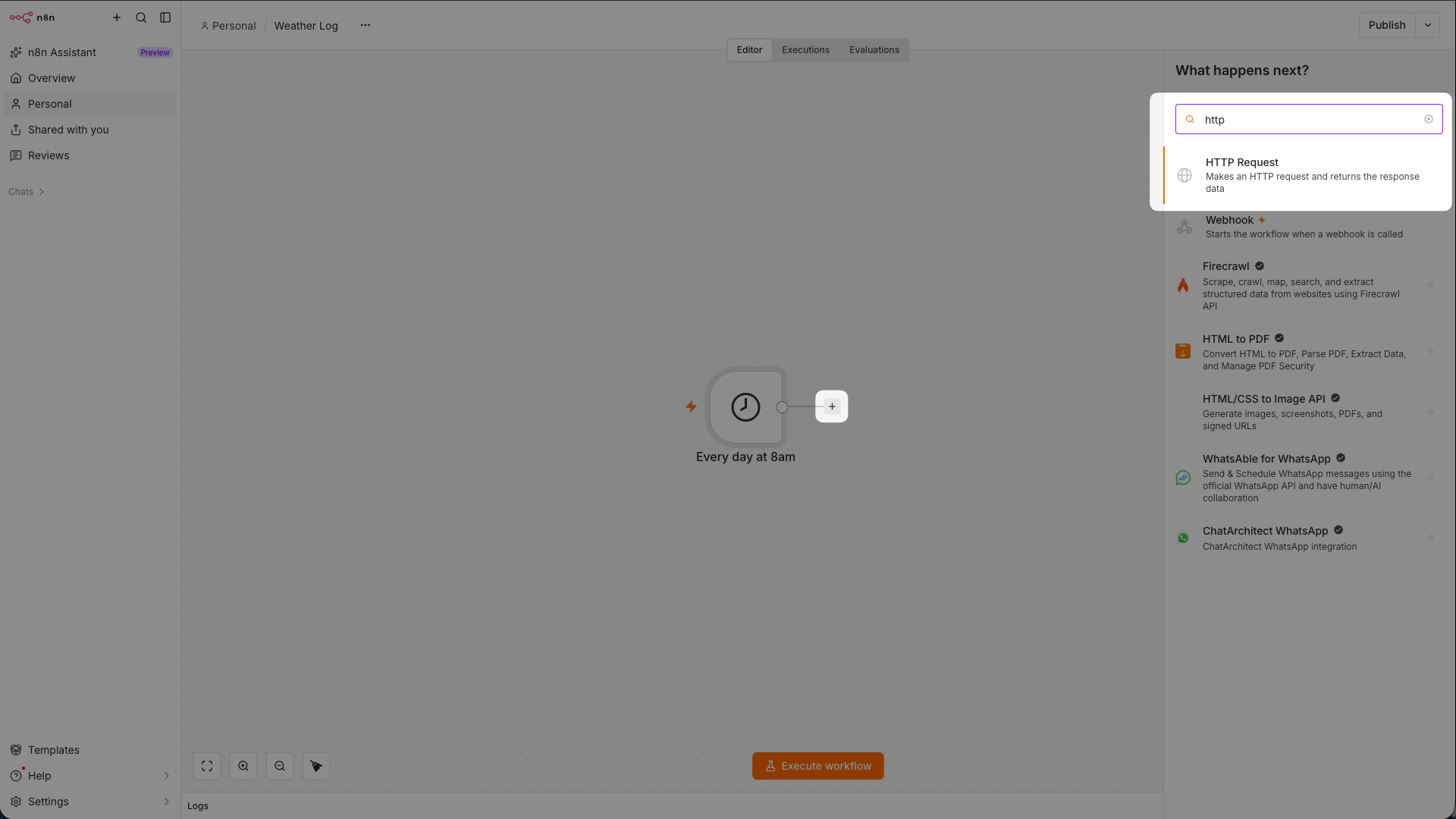
!Official n8n reference: add an action after a trigger
Official n8n tutorial image, referenced on 2026-10-18; its original capture date and exact version are not declared. The pictured HTTP Request node illustrates the native action-picker layout, not this service’s installation or output. Use this package’s service name in your own picker. Official source.
Read an existing task first
1. Add this node after a trigger and choose Resource → Task, Operation → Get. Select the credential for this service.
2. Paste an existing task ID returned by this same service. The Task ID field is not a prompt or a video/image URL. Leave creation and n8n retry-on-fail off.
3. Execute that query node once. Continue only when finished and successful are true; inspect data for the final media URL. A pending response or task ID is not the final output. Record 401/403 and check access rather than creating a replacement task.
For new creation, choose Resource → Image, Operation → Generate, then explicitly select the model and inputs. Check n8n verification requirements.
Credentials
1. Open source=opensource&utmmedium=referral&utmcampaign=evergreen&utmcontent=gptimagen8nreadmepricing”>current pricing.
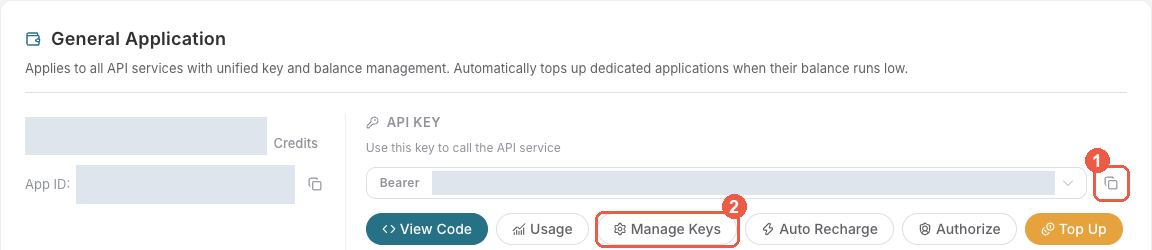
3. Copy the API Key from the application card, or open Keys / Manage Keys → Create to create a separate key for this integration. Give it a recognizable name so you can revoke or rotate it independently.
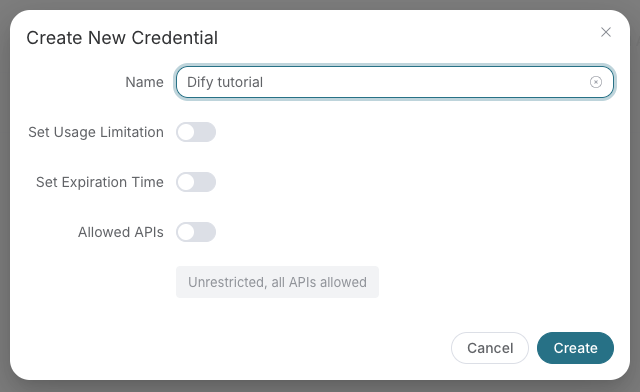
4. When creating a key, review Expiration Time, Set Usage Limitation, and Allowed APIs. Enable only the restrictions you need, allow the operations you will call, then click Create and copy the token from the key list. Task lookup does not grant permission to submit a generation. Confirm the application’s balance can cover your first request; any trial allowance is whatever your account currently displays.
5. Copy only the token value, without quotation marks, spaces, or Bearer . An API Key / API Token field expects this raw value; only a manually configured HTTP Authorization header needs the Bearer prefix. A platform-... account-management token cannot replace a generation API key.
!Copy an application API key or open Manage Keys
!Create a separately named key with optional restrictions
Save the key in the client’s credential store or the environment variable shown below. Never put it in a prompt, shared workflow, screenshot, or Git commit. If authentication fails, check the full copied value, application/service access, expiration, usage limit, and balance before creating another key.
In n8n, open a node and create a GPT Image by Ace Data Cloud API credential. Paste the raw value into API Token, save, and select this credential on every node that needs it, including task readers.
The token is masked and stored in n8n’s credential store. The node sends Bearer authentication only to https://api.acedata.cloud. Its credential test queries an empty task batch and does not generate media. Do not use a platform management token.
Quick start and examples
Import Generate and wait, assign credentials to Create and Get Task, and edit the generation parameters. One manual execution submits once, then queries every 15 seconds. The loop has a 30-minute deadline and explicit failure handling. A deadline stops waiting; it does not cancel a submitted service task.
Import AI Agent task tool to use the node as a read-only tool. Replace the sample task ID, configure the chat model and select the service credential. The agent queries a task once; it does not create media.
Additional examples are in examples/. They contain no credentials and no pinned or fabricated output.
Example output
Generated through this node with gpt-image-2 during live validation:
Parameters and limits
Output and task states
With Simplify enabled:
Disable Simplify to receive the API response unchanged. Batch queries emit one item per task, preserving the relationship to the originating n8n input item.
Billing, retries and errors
Generation uses your AceDataCloud balance. Check asset provenance.
Development
pnpm install --frozen-lockfile
pnpm run build
pnpm run lint
pnpm test
Programmatic nodes validate conditional media payloads, normalize asynchronous task responses and preserve input-item links. All service requests use n8n’s authenticated HTTP helper. Unit tests mock the HTTP boundary; they do not incur generation charges.
Releases are built from merged source through GitHub Actions with npm publish --provenance. Publication runs build, lint and tests. Keep published versions immutable and update CHANGELOG.md for new releases.
Resources and support
Include the package version, n8n version, operation and a redacted error when reporting issues. Never include API tokens or private media.
Reproduce the package installation check
Run pnpm run build && bash scripts/smoke-docker.sh with Docker available. The script creates npm pack, installs that exact tarball in isolated n8n 2.43.7, checks bundled native metadata, help links, icons and masked credential fields, imports the credential-free smoke workflow, and confirms execution stops before any API call. The archive manifest and loading log are saved in artifacts/. This checks real host package installation/loading and missing-credential behavior; it does not prove ordinary UI search, an authorized service response, a terminal media task, billing or acquisition.