

Description

n8n-nodes-comfyui-any
This package provides n8n nodes to integrate with ComfyUI – Support any workflow output.
Background
In n8n, if I want to obtain the images generated by comfyui, I can use it n8n-nodes-comfyui。If I want to obtain the videos generated by comfyui, I can use it n8n-nodes-comfyui-image-to-video。But if I want to obtain the output of a custom node in comfyui, what should I do? Then you can give it a try n8n-nodes-comfyui-any
Example
Suppose our custom node of comfyui is as follows:
comfyui workflow and sample images
{“id”:”bdd2c995-cc7a-416b-b119-3793579a40b2″,”revision”:0,”lastnodeid”:14,”lastlinkid”:11,”nodes”:[{“id”:13,”type”:”StringLength”,”pos”:[1412.6959228515625,726.2750244140625],”size”:[400,200],”flags”:{},”order”:0,”mode”:0,”inputs”:[{“localizedname”:”string”,”name”:”string”,”type”:”STRING”,”widget”:{“name”:”string”},”link”:null}],”outputs”:[{“localizedname”:”length”,”name”:”length”,”type”:”INT”,”links”:[11]}],”properties”:{“cnrid”:”comfy-core”,”ver”:”0.3.52″,”Node name for S&R”:”StringLength”},”widgetsvalues”:[“string length”]},{“id”:14,”type”:”easy showAnything”,”pos”:[1890.91845703125,766.418212890625],”size”:[140,76],”flags”:{},”order”:1,”mode”:0,”inputs”:[{“localizedname”:”输入任何”,”name”:”anything”,”shape”:7,”type”:”“,”link”:11}],”outputs”:[{“localizedname”:”输出”,”name”:”output”,”type”:”“,”links”:null}],”properties”:{“cnrid”:”comfyui-easy-use”,”ver”:”93254a4c073431ad45be5bef0e66bd38f40a2583″,”Node name for S&R”:”easy showAnything”},”widgetsvalues”:[“13″]}],”links”:[[11,13,0,14,0,”*”]],”groups”:[],”config”:{},”extra”:{“ds”:{“scale”:0.8954302432552947,”offset”:[-819.6894744665262,-274.54124324273243]}},”version”:0.4}
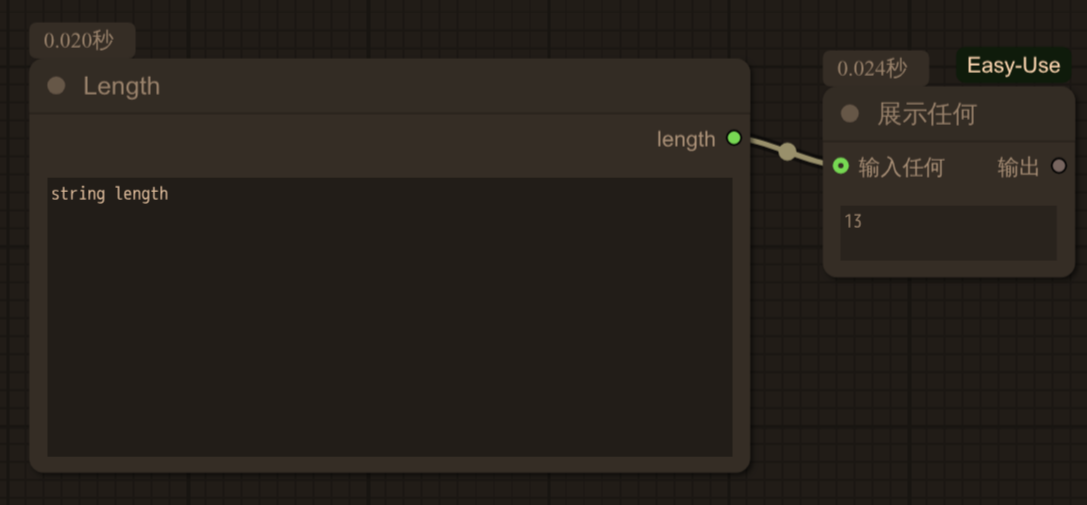
The final result will be returned
[{"14":{"text":["13"]}}]
In this way, you will get the result you want.
Features
- Execute ComfyUI workflows directly from n8n
- Support for workflow JSON import
- Support any workflow output
- Progress monitoring and error handling
- Support for API key authentication
- Configurable timeout settings
Node Configuration
Installation
npm install n8n-nodes-comfyui-any
ComfyUI Node
This node allows you to execute ComfyUI workflows and Support any workflow output
#### Settings
#### Outputs
promptResult.outputs
Usage Example
1. Export your workflow from ComfyUI as JSON
2. Create a new workflow in n8n
3. Add the ComfyUI node
4. Paste your workflow JSON
5. Configure the API URL
Error Handling
The node includes comprehensive error handling for: