Description
n8n-nodes-sogni
Enhanced n8n Community Node for Sogni AI Image, Video, Audio, LLM & Creative-Workflow Generation
Generate AI images, videos, audio, LLM responses, and full hosted multi-step creative workflows on the Sogni AI Supernet — directly from your n8n workflows. Highlights:
- Image — text-to-image with full ControlNet (15 types), Qwen Image Edit with multi-reference context images, and a dynamic server-validated size-preset dropdown.
- Video — LTX-2.3, WAN 2.2, and Seedance families with cost estimation, ControlNet, image-to-video, sound-to-video, animate, and v2v workflows.
- Audio — generate music and instrumental audio (ACE-Step) with optional lyrics, BPM/time signature/key, composer mode, and cost estimation. (new in 1.7.0)
- LLM — Sogni Intelligence chat models with optional tool calling and vision input, a one-click toggle to expose Sogni’s hosted creative tool manifest to the model, and pre-flight cost estimates. (new in 1.7.0)
- Creative Workflow — start, list, fetch events for, and cancel hosted multi-step Sogni workflows (storyboard → keyframes → video, etc.) with optional poll-until-terminal mode. (new in 1.7.0)
- Generate: Create AI images with optional ControlNet guidance and a server-validated Size Preset dropdown that adapts to the chosen model + network.
- Edit: Edit images using Qwen Image Edit models with context images.
- Generate: Create AI videos with customizable parameters.
- Estimate Cost: Estimate token/USD cost before generation.
- Generate: Create music or instrumental audio (ACE-Step) with optional lyrics, BPM, time signature, key/scale, composer mode, and creativity controls.
- Estimate Cost: Estimate token/USD cost for an audio request.
- Generate: Create text responses with Sogni chat models. Supports custom tool calling via Tools JSON, and a one-click Enable Sogni Hosted Tools toggle that injects Sogni’s hosted creative tool manifest (
generateimage,generatevideo,generatemusic,editimage,animatephoto,applystyle, etc.) so the model can call Sogni tools without hand-authored tool definitions. (toggle new in 1.7.0) - Estimate Cost: Pre-flight chat cost estimate for a model + messages + max_tokens combination. (new in 1.7.0)
- Get All: List all available Sogni LLM/chat models.
- Start: Run a hosted multi-step workflow from a saved template (
Template ID+Inputs JSON) or an inline plan (Inline Workflow JSONwithsteps[]). Optional Wait Until Terminal polling. - Get: Fetch a workflow record by ID.
- List: List recent workflows (limit/offset).
- Get Events: Stream the event history for a workflow.
- Cancel: Cancel an in-flight workflow.
- Get All: List all available models.
- Get: Get specific model details.
- Get Most Popular: Get the model with the most active workers in a single call. (new in 1.7.0)
- Get Balance: Check SOGNI and Spark token balance.
This node uses your Sogni account credentials. Sign up for free to get 50 free Render credits per day. Under the hood, the project uses @sogni-ai/sogni-intelligence-client, which is built on top of the official @sogni-ai/sogni-client SDK.
—
Features
Resources & Operations
#### Image Resource
#### Video Resource
#### Audio Resource (new in 1.7.0)
#### LLM Resource
#### Creative Workflow Resource (new in 1.7.0)
#### Model Resource
#### Account Resource
See CHANGELOG.md for the full 1.7.0 release notes.
—
Installation
Option 1: Community Nodes UI (Recommended)
1. In n8n, open Settings ▸ Community Nodes
2. Select Install
3. Enter n8n-nodes-sogni
4. Confirm the installation (restart n8n if prompted)
Option 2: Manual Installation
Run in your n8n installation directory
npm install n8n-nodes-sogni
Restart your n8n instance after installation
—
Configuration
1. Add Credentials
1. In n8n, go to Credentials
2. Click Add Credential
3. Search for “Sogni AI”
4. Enter your credentials:
– Username: Your Sogni account username
– Password: Your Sogni account password
– App ID: (Optional) Leave empty for auto-generation
2. Add Node to Workflow
1. Create or open a workflow
2. Click + to add a node
3. Search for “Sogni AI”
4. Select the node and configure
—
Basic Usage
> 💡 Tip: You can import example workflows directly into n8n! Create a new workflow, click the ⋮ (three dots) in the top right corner, select Import from File…, and choose a sample workflow from the ./examples folder.
Simple Image Generation
{
  "resource": "image",
  "operation": "generate",
  "modelId": "flux1-schnell-fp8",
  "positivePrompt": "A beautiful sunset over mountains",
  "network": "fast",
  "additionalFields": {
    "negativePrompt": "blurry, low quality",
    "steps": 20,
    "guidance": 7.5,
    "tokenType": "spark",
    "downloadImages": true
  }
}
ControlNet-Guided Generation
{
  "resource": "image",
  "operation": "generate",
  "modelId": "flux1-schnell-fp8",
  "positivePrompt": "A fantasy castle, magical, glowing",
  "network": "fast",
  "additionalFields": {
    "enableControlNet": true,
    "controlNetType": "canny",
    "controlNetImageProperty": "data",
    "controlNetStrength": 0.7,
    "controlNetMode": "balanced",
    "steps": 20,
    "downloadImages": true
  }
}
Video Generation
{
  "resource": "video",
  "operation": "generate",
  "videoModelId": "wanv2.2-14b-fp8t2v_lightx2v",
  "videoPositivePrompt": "A serene waterfall flowing through a lush green forest",
  "videoNetwork": "fast",
  "videoAdditionalFields": {
    "videoSettings": {
      "frames": 81,
      "fps": 16,
      "steps": 4,
      "guidance": 7.5
    },
    "output": {
      "downloadVideos": true,
      "outputFormat": "mp4",
      "width": 640,
      "height": 640
    },
    "advanced": {
      "tokenType": "spark",
      "timeout": 300000
    }
  }
}
Image Edit with Qwen
{
  "resource": "image",
  "operation": "edit",
  "imageEditModelId": "qwenimageedit2511fp8_lightning",
  "imageEditPrompt": "Change the background to a beautiful sunset beach",
  "contextImage1Property": "data",
  "imageEditNetwork": "fast",
  "imageEditAdditionalFields": {
    "generationSettings": {
      "negativePrompt": "blurry, distorted",
      "numberOfMedia": 1
    },
    "output": {
      "downloadImages": true,
      "outputFormat": "png"
    },
    "advanced": {
      "tokenType": "spark"
    }
  }
}
—
ControlNet Types
All 15 ControlNet types are supported:
| Type | Description | Best For |
|——|————-|———-|
| canny | Edge detection | Structure preservation |
| scribble | Hand-drawn sketches | Sketch to image |
| lineart | Line art extraction | Clean line drawings |
| lineartanime | Anime line art | Anime/manga style |
| softedge | Soft edge detection | Artistic control |
| shuffle | Composition transfer | Layout preservation |
| tile | Tiling patterns | Seamless textures |
| inpaint | Masked area filling | Object removal/editing |
| instrp2p | Instruction-based editing | Text-guided edits |
| depth | Depth map | 3D structure |
| normalbae | Normal map | Surface details |
| openpose | Pose detection | Human pose transfer |
| segmentation | Semantic segmentation | Layout control |
| mlsd | Line segment detection | Architecture |
| instantid | Identity preservation | Face consistency |
See ControlNet Guide for detailed usage instructions.
—
Parameters
Required Parameters
| Parameter | Type | Description |
|———–|——|————-|
| Model ID | string | AI model to use (e.g., flux1-schnell-fp8) |
| Positive Prompt | string | What you want to generate |
| Network | options | fast (SOGNI tokens) or relaxed (Spark tokens) |
Optional Parameters (Additional Fields)
| Parameter | Type | Default | Description |
|———–|——|———|————-|
| Negative Prompt | string | “” | What to avoid |
| Style Prompt | string | “” | Style description |
| Number of Images | number | 1 | How many images (1-10) |
| Steps | number | 20 | Inference steps (1-100) |
| Guidance | number | 7.5 | Prompt adherence (0-30) |
| Token Type | options | spark | spark or sogni |
| Output Format | options | png | png or jpg |
| Download Images | boolean | true | Download as binary data |
| Size Preset | string | “” | Size preset ID |
| Width | number | 1024 | Custom width (256-2048) |
| Height | number | 1024 | Custom height (256-2048) |
| Seed | number | random | Reproducibility seed |
| Timeout | number | 600000 | Max wait time (ms) |
ControlNet Parameters
| Parameter | Type | Default | Description |
|———–|——|———|————-|
| Enable ControlNet | boolean | false | Enable ControlNet |
| ControlNet Type | options | canny | Type of ControlNet |
| Control Image Property | string | data | Binary property name |
| Strength | number | 0.5 | Control strength (0-1) |
| Mode | options | balanced | balanced / promptpriority / cnpriority |
| Guidance Start | number | 0 | When to start (0-1) |
| Guidance End | number | 1 | When to end (0-1) |
Video Generation Parameters
#### Required Parameters
| Parameter | Type | Description |
|———–|——|————-|
| Video Model ID | string | AI model to use for video generation |
| Video Positive Prompt | string | What you want in the video |
| Video Network | options | fast or relaxed |
#### Optional Video Parameters
| Parameter | Type | Default | Description |
|———–|——|———|————-|
| Negative Prompt | string | “” | What to avoid in video |
| Style Prompt | string | “” | Video style description |
| Number of Videos | number | 1 | How many videos (1-4) |
| Frames | number | 30 | Number of frames (10-120). For LTX-2 use 8n+1 frame counts |
| Duration | number | auto | Optional seconds for model-aware frame calculation |
| FPS | number | 30 | Frames per second (10-60) |
| Steps | number | 20 | Inference steps (1-100) |
| Guidance | number | 7.5 | Prompt adherence (0-30) |
| Shift | number | model default | Optional motion intensity control |
| TeaCache Threshold | number | model default | Optional T2V/I2V optimization control |
| Sampler | string | model default | Optional sampler override |
| Scheduler | string | model default | Optional scheduler override |
| Reference Image Property | string | “” | Binary property for i2v/s2v/animate workflows |
| Reference End Image Property | string | “” | Binary property for interpolation end frame |
| Reference Audio Property | string | “” | Binary property for s2v workflows |
| Reference Video Property | string | “” | Binary property for animate/v2v workflows |
| Video Start | number | 0 | Optional source-video offset (seconds) |
| Audio Start | number | 0 | Optional source-audio offset (seconds) |
| Audio Duration | number | server default | Optional source-audio duration (seconds) |
| Trim End Frame | boolean | false | Useful for transition stitching |
| First Frame Strength | number | model default | LTX-2 keyframe interpolation control (0-1) |
| Last Frame Strength | number | model default | LTX-2 keyframe interpolation control (0-1) |
| SAM2 Coordinates (JSON) | string | “” | Animate-replace subject points, e.g. [{"x":0.5,"y":0.5}] |
| Enable LTX-2 Video ControlNet | boolean | false | Enables controlNet for LTX v2v |
| Video ControlNet Type | options | canny | canny, pose, depth, detailer |
| Video ControlNet Strength | number | 0.8 | ControlNet strength for v2v |
| Output Format | options | mp4 | Currently only mp4 is supported |
| Download Videos | boolean | true | Download as binary data |
| Width | number | 512 | Video width (256-1024) |
| Height | number | 512 | Video height (256-1024) |
| Timeout | number | auto | Max wait time (ms) |
| Auto Resize Video Assets | boolean | true | Normalize/resize reference assets for video compatibility |
Image Edit Parameters (Qwen)
#### Required Parameters
| Parameter | Type | Description |
|———–|——|————-|
| Image Edit Model ID | string | Qwen Image Edit model to use |
| Edit Prompt | string | Description of the edit to apply |
| Context Image 1 | string | Binary property name for first context image (required) |
| Network | options | fast or relaxed |
#### Optional Parameters
| Parameter | Type | Default | Description |
|———–|——|———|————-|
| Context Image 2 | string | “” | Binary property for second context image |
| Context Image 3 | string | “” | Binary property for third context image |
| Negative Prompt | string | “” | What to avoid in result |
| Style Prompt | string | “” | Style description |
| Number of Images | number | 1 | How many images (1-10) |
| Steps | number | auto | Inference steps (auto: 20 for standard, 4 for lightning) |
| Guidance | number | auto | Prompt adherence (auto: 4.0 for standard, 1.0 for lightning) |
| Download Images | boolean | true | Download as binary data |
| Output Format | options | png | png or jpg |
| Token Type | options | spark | spark or sogni |
| Timeout | number | auto | Max wait time (ms) |
#### Qwen Image Edit Models
| Model ID | Description | Recommended Steps |
|———-|————-|——————-|
| qwenimageedit2511fp8 | Standard quality model | 20 steps |
| qwenimageedit2511fp8_lightning | Fast lightning model | 4 steps |
—
Example Workflows
See the examples directory for complete workflow JSON files:
1. Basic Image Generation – Simple text-to-image
2. Batch Processing – Generate multiple images
3. Dynamic Model Selection – Auto-select best model
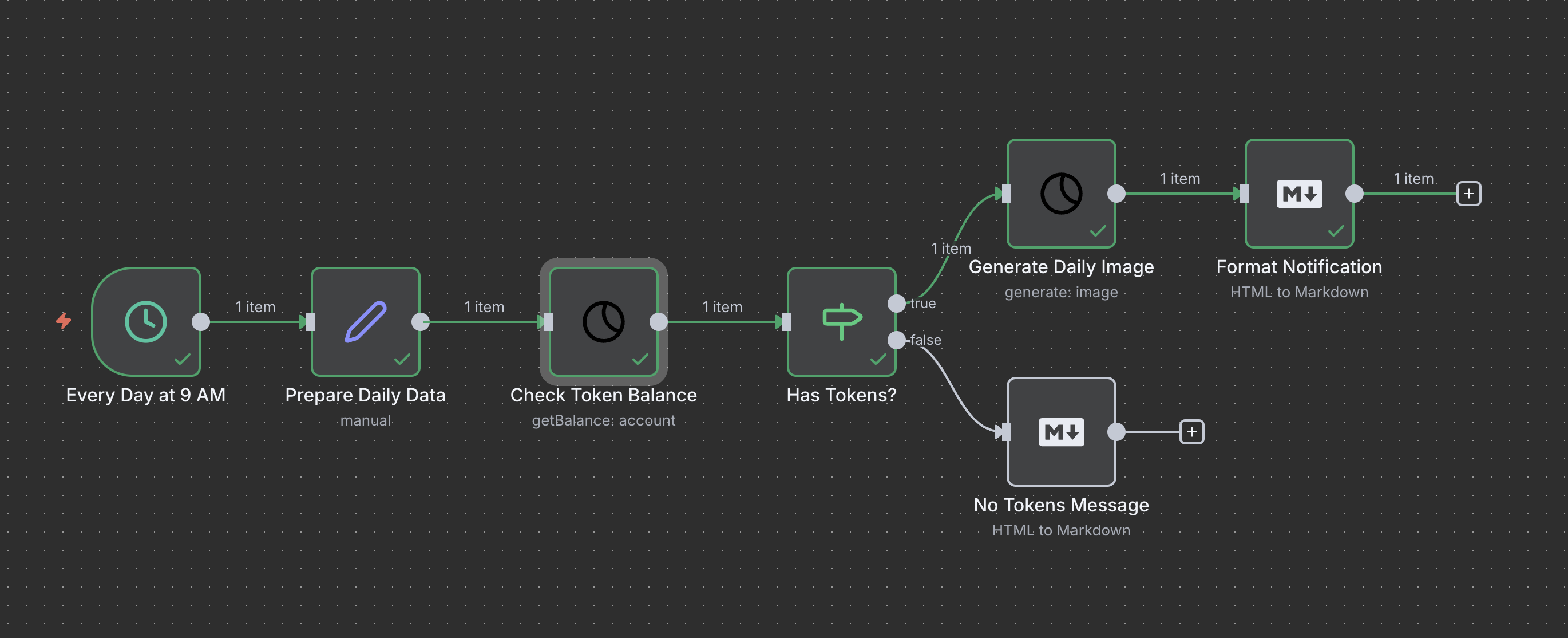
4. Scheduled Generation – Daily automated images
5. Video Generation – AI video creation with customizable parameters
6. Image Edit with Qwen – Edit images using context-aware Qwen models
7. Emotional Slothi Telegram Bot – Dynamic Qwen image-edit + Telegram posting
8. LTX-2 Video-to-Video ControlNet – Advanced v2v workflow with reference video + controls
9. WAN Animate-Replace with SAM2 – Subject-guided video replacement with reference image + source video
10. LTX-2 Text-to-Video – Minimal prompt-only LTX t2v workflow
11. LTX 2.3 Dynamic Text-to-Video – Auto-select an available ltx23-* model before generation
12. Sogni LLM Person Poem Page – Ask for a person’s name in an n8n form, auto-select an available chat model, generate a witty rhyming poem, and show it on n8n’s completion page
13. Sogni LLM Describe Uploaded Image – Upload an image in an n8n form, send it to the documented Qwen3.5 VLM path, and show the generated description on n8n’s completion page
—
Output
Image Generation Output
#### JSON Output
{
  "projectId": "ABC123...",
  "modelId": "flux1-schnell-fp8",
  "prompt": "A beautiful sunset...",
  "imageUrls": [
    "https://complete-images-production.s3-accelerate.amazonaws.com/..."
  ],
  "completed": true,
  "jobs": [
    {
      "id": "JOB123...",
      "status": "completed"
    }
  ]
}
#### Binary Output (when downloadImages = true)
Video Generation Output
#### JSON Output
{
  "projectId": "VID123...",
  "modelId": "video-model-id",
  "prompt": "A cat playing...",
  "videoUrls": [
    "https://complete-videos-production.s3-accelerate.amazonaws.com/..."
  ],
  "completed": true,
  "jobs": [
    {
      "id": "JOB456...",
      "status": "completed"
    }
  ]
}
#### Binary Output (when downloadVideos = true)
Binary data includes:
sognivideo[projectId]_[index].[ext]Image Edit Output
#### JSON Output
{
  "projectId": "EDIT123...",
  "modelId": "qwenimageedit2511fp8_lightning",
  "prompt": "Change the background to a sunset beach",
  "imageUrls": [
    "https://complete-images-production.s3-accelerate.amazonaws.com/..."
  ],
  "completed": true,
  "contextImagesCount": 1,
  "jobs": [
    {
      "id": "JOB789...",
      "status": "completed"
    }
  ]
}
#### Binary Output (when downloadImages = true)
Binary data includes:
sogniedit[projectId]_[index].[ext]—
Tips & Best Practices
1. Network Selection
– Uses SOGNI tokens
– Faster generation (seconds to minutes)
– Higher cost
– Best for: Time-sensitive applications
– Uses Spark tokens
– Slower generation (minutes to hours)
– Lower cost
– Best for: Batch processing, scheduled jobs
2. Model Selection
Popular models:
flux1-schnell-fp8: Fast, high quality, 4 steps recommendedcoreml-sogniartistv1_768: Artistic stylechroma-v.46-flash_fp8: Fast generationUse “Get All Models” operation to see all available models.
3. Steps Configuration
4. ControlNet Usage
balanced mode for most cases5. Image Download
downloadImages to prevent URL expiry6. Timeout Configuration
7. Video Generation Tips
8. Image Edit Tips (Qwen)
lightning variant for fast results (4 steps), standard for quality (20 steps)—
Troubleshooting
“Insufficient funds” Error
Solution: Add more Spark or SOGNI tokens to your account
“Model not found” Error
Solution: Use “Get All Models” to see available models
“No binary data found” (ControlNet)
Solution:
1. Ensure previous node outputs binary data
2. Check the binary property name
3. Use “View” in n8n to inspect data
Workflow Times Out
Solution:
Images Not Downloaded
Solution:
downloadImages is enabled“No binary data found” (Image Edit)
Solution:
1. Ensure previous node outputs binary data with the correct property name
2. Check contextImage1Property matches your binary property (default: data)
3. Use “View” in n8n to inspect binary data from previous node
4. For multiple context images, verify each property name is correct
Image Edit Results Unexpected
Solution:
qwenimageedit2511fp8) for better quality—
Advanced Usage
Combining with Other Nodes
#### Discord Integration
Sogni Generate → HTTP Request (Discord Webhook)
#### Google Drive Storage
Sogni Generate → Google Drive (Upload File)
#### Social Media Posting
Sogni Generate → Twitter/Instagram API
#### Image Processing Pipeline
Load Image → Sogni ControlNet → Post-Processing → Save
Dynamic Prompts
Use expressions to generate dynamic prompts:
{{ "A " + $json.style + " image of " + $json.subject }}
Conditional ControlNet
Enable ControlNet based on conditions:
{{ $json.hasControlImage ? true : false }}
—
API Reference
Wrapper Library
This node uses the @sogni-ai/sogni-intelligence-client library. For standalone Node.js usage:
import { SogniClientWrapper } from '@sogni-ai/sogni-intelligence-client';const client = new SogniClientWrapper({
username: 'your-username',
password: 'your-password',
appSource: 'n8n-nodes-sogni',
autoConnect: true,
});
const result = await client.createProject({
modelId: 'flux1-schnell-fp8',
positivePrompt: 'A beautiful sunset',
network: 'fast',
tokenType: 'spark',
waitForCompletion: true,
});
See @sogni-ai/sogni-intelligence-client for full API documentation.
—
Version History
v1.7.0 (Current)
@sogni-ai/sogni-intelligence-client to ^2.3.0, including @sogni-ai/sogni-client@^5.0.0-alpha.11.
appSource attribution for all n8n Sogni connections. image size presets, and Model Get Most Popular. See CHANGELOG.md
for the full notes.
v1.5.7
@sogni-ai/sogni-client-wrapper to v1.6.1@sogni-ai/sogni-client@4.1.1v1.5.5
Generate and Get All chat model operations – Messages JSON
– Tools JSON
– Tool Choice JSON
LLM -> Generate outputs so looped/stateful workflows can carry execution state forward – person poem generation with n8n forms and completion pages
– uploaded-image description using the documented Qwen3.5 VLM path
examples/duck.jpg) for quick vision workflow testing@sogni-ai/sogni-client-wrapper to v1.6.0v1.4.2
examples/10-ltx2-text-to-video.json)@sogni-ai/sogni-client-wrapper to v1.5.2ltx23- / ltx2.3- video model detection and LTX frame normalization coverageexamples/11-ltx23-dynamic-text-to-video.json)v1.4.0
@sogni-ai/sogni-client-wrapper to v1.4.3Video → Estimate Cost operation (wrapper estimateVideoCost)ltx2-, ltx23-, and wan_* model familiesreferenceVideo, referenceAudio, SAM2, keyframe strengths, video ControlNet)4.0 standard, 1.0 lightning)Auto Resize Video Assets toggle for video generationv1.3.1
v1.3.0
v1.2.0
v1.1.9
v1.1.8
v1.1.6
v1.1.5
v1.1.0-1.1.4
v1.0.0
—
Resources
—
Support
For issues or questions:
1. Check this README
2. Review the ControlNet Guide
3. Check example workflows
4. Submit an issue on GitHub
—
License
MIT License – See LICENSE file for details
—
Credits
Built with:
—
Ready to generate and edit amazing AI images in your n8n workflows! 🎨✨