Description

n8n-nodes-quickemailverification
Verify email addresses inside your n8n workflows — one address at a time, or a whole list at once.
This is the official community node for the QuickEmailVerification API.
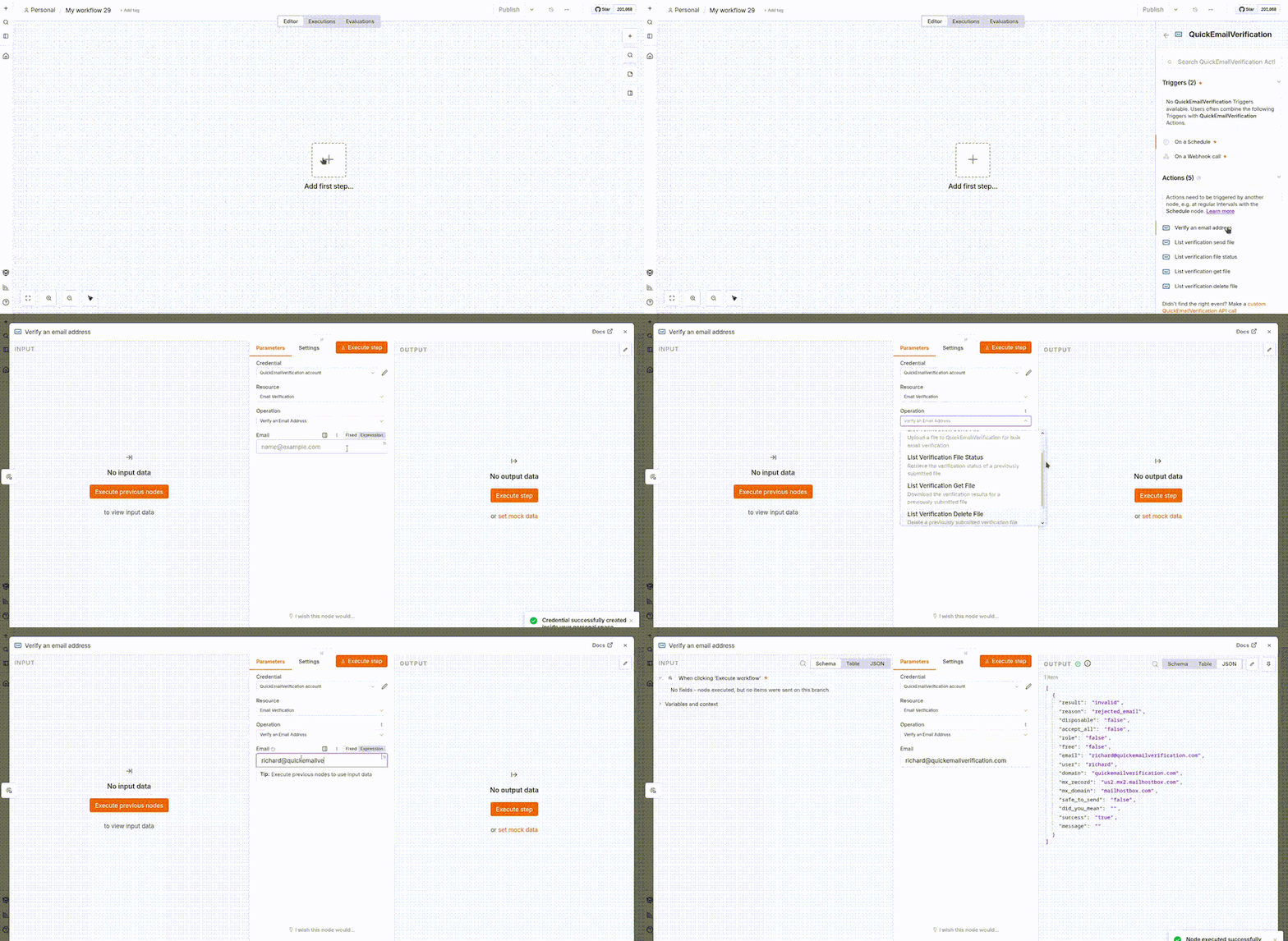
!QuickEmailVerification Node Overview
Contents: Install · API key · Quick start ·
Operations · Building a list from workflow items ·
Waiting for a list to finish · Errors · Reference
Install
In n8n, open Settings → Community Nodes → Install and enter:
@quickemailverification/n8n-nodes-quickemailverification
See the n8n community node installation guide if you
self-host and prefer installing from npm. To build from a clone of this repository:
The n8n-workflow devDependency pulls in isolated-vm (via @n8n/expression-runtime),
a native module that ships prebuilds only for Node 22 and 24. On Node 20 its install
script falls back to compiling from source, which fails. Nothing in this node's build
loads it — n8n provides its own at runtime — so skipping install scripts is safe.
On Node 22+ a plain npm install works too.
npm install --ignore-scripts
npm run build
API key
1. Sign in at quickemailverification.com and copy the API key from your dashboard.
2. In n8n, add a QuickEmailVerification API credential and paste the key.
That single key covers every operation — the node sends it both as the apikey query parameter and as an
Authorization: token header, depending on what each endpoint expects. Saving the credential verifies it against
the free sandbox, so setting it up never costs you a credit.
Quick start
Check one address. Add the node, pick Verify an Email Address, and point the Email field at your data —
{{ $json.email }}. The result comes back in the same execution, so you can branch on it immediately:
QuickEmailVerification → Switch on {{ $json.result }} → valid / invalid / unknown
Check a list. List verification is asynchronous — three operations, tied together by the file_id you get from the
first:
List Verification Send File  →  file_id
                                  ↓
                          File Status  →  file_status: "Complete"
                                  ↓
                            Get File  →  one item per verified address
Send File returns as soon as QuickEmailVerification accepts the upload; it does not sit and wait for the results. See
Waiting for a list to finish for the two ways to bridge that gap.
Operations
All operations sit under a single Resource, Email Verification, which is preselected —
choose the Operation below it.
| Operation | What it does |
| :—————————- | :————————————————————————– |
| Verify an Email Address | Verify a single email address (real-time). |
| List Verification Send File | Upload a file to QuickEmailVerification for bulk email verification. |
| List Verification File Status | Retrieve the verification status of a previously submitted file. |
| List Verification Get File | Download the verification results for a previously submitted file. |
| List Verification Delete File | Delete a previously submitted verification file and its associated results. |
Verify an Email Address
Takes one Email and returns the API response untouched. Every field below comes straight from
the API:
| Field | Meaning |
| :————- | :—————————————————————————– |
| result | valid, invalid or unknown |
| reason | Why, see the reason codes below |
| disposable | true if the email address uses a disposable domain |
| accept_all | true if the domain appears to accept all emails delivered to that domain |
| role | true if the email address is a role address |
| free | true if the email address is from a free email provider like Gmail or Yahoo! |
| email | The email address that was verified |
| user | The local part of the email address |
| domain | The domain of the provided email address |
| mx_record | The preferred MX record of the email domain |
| mx_domain | The domain name of the MX host |
| safetosend | true if the email address is safe for deliverability |
| didyoumean | A corrected address when a likely typo is detected |
| success | true if the API request was successful |
| message | Describes the API call failure reason |
reason is one of invalidemail, invaliddomain, rejectedemail, acceptedemail, no_connect, timeout,
unavailablesmtp, unexpectederror, nomxrecord, temporarilyblocked or exceededstorage.
Nothing is added or renamed — what the API returns is what lands in your workflow:
{
	"result": "invalid",
	"reason": "rejected_email",
	"disposable": "false",
	"accept_all": "false",
	"role": "false",
	"free": "false",
	"email": "richard@quickemailverification.com",
	"user": "richard",
	"domain": "quickemailverification.com",
	"mx_record": "us2.mx1.mailhostbox.com",
	"mx_domain": "mailhostbox.com",
	"safetosend": "false",
	"didyoumean": "",
	"success": "true",
	"message": ""
}
result alone is not always the decision you want. safetosend is the stricter verdict — an accept_all domain can
return valid while nobody is really behind the address. When didyoumean is not empty, offering the correction back
to the user usually beats rejecting them outright.
List Verification Send File
Uploads the list and returns immediately with the ID it was accepted under.
| Parameter | Required | Notes |
| :——————— | :————- | :—————————————————————————————– |
| Input Type | yes | File to upload something you already have, Items to build the CSV from input items |
| Input Binary Field | File input | Binary property holding the CSV/TXT list, e.g. from a Read/Write Files or HTTP Request node |
| Item Input Type | Items input | Field Assignment, JSON Input or Mapped — see below |
| Combine Items | no, default on | Merge every input item into one upload. Off means one upload per item. |
| Include File | no | Return the generated CSV as binary data as well |
| Filename | no | Custom name for the list, sent as X-QEV-Filename |
| Return URL | no | The API POSTs results here on completion (X-QEV-Callback), retrying 3 times for a 2xx |
| Notification Email | no | Address to notify when verification finishes |
The API takes CSV uploads and keeps any extra columns you include, so your own data comes back alongside the results. A
file it cannot read is rejected with 400 Bad Request.
{
	"success": true,
	"message": "File Accepted",
	"filename": "n8nvalidation.csv",
	"file_id": "7138f61de8da380c345374c08bd64599",
	"item_count": 2,
	"return_url": null
}
List Verification File Status
Takes a File ID and reports where the file has got to. The API’s own states — running, completed, failed
(the list failed scanning) and ready (waiting on account credits) — are reported as file_status: Processing,
Complete, Failed and Queued.
{
	"success": true,
	"file_id": "7138f61de8da380c345374c08bd64599",
	"filename": "emaillist.csv",
	"upload_date": "2026-07-29T04:06:08.000Z",
	"file_status": "Complete",
	"complete_percentage": "100%",
	"error_reason": null,
	"return_url": null,
	"total_email": 100,
	"result_counts": { "safetosend": 68, "valid": 82, "invalid": 16, "unknown": 2 },
	"completed_date": "2026-07-29T04:06:45.000Z",
	"processing_time": 37
}
return_url is always null; the API does not echo the callback URL back.
List Verification Get File
Downloads one of the five reports QuickEmailVerification publishes for a finished file. Errors if it is still
processing.
| Parameter | Required | Notes |
| :————————– | :—————– | :——————————————————————- |
| File ID | yes | The ID from Send File |
| Report | yes | fullreport, safetosend, valid, invalid or unknown |
| Output | yes | Emails for one item per address, File for the raw CSV as binary |
| Remove Duplicate Emails | no | Emails output only |
| Include File | no | Emails output only — attach the CSV as well |
| Output Filename | no | Defaults to the name the API served, else _
| Output Binary Field | no, default data | Where the CSV is written |
With Emails you get one item per row, using the report’s own column names plus the file_id it came from:
[
	{
		"email": "john@example.com",
		"result": "valid",
		"reason": "accepted_email",
		"safetosend": true,
		"file_id": "7138f61de8da380c345374c08bd64599"
	}
]
With File you get a single item carrying the CSV as binary, described by:
{
	"success": true,
	"file_id": "7138f61de8da380c345374c08bd64599",
	"filename": "n8nvalidation_processed.csv",
	"remotefilename": "n8nvalidationprocessed.csv",
	"file_extension": "csv",
	"mime_type": "text/csv",
	"file_size": 444,
	"report": "fullreport"
}
Either way, when the CSV is attached n8n’s Binary tab shows it with working View and Download buttons and
the usual file details. With Emails it rides on the first item only, so it is not repeated on every record.
List Verification Delete File
Removes a file and its reports early, rather than waiting for the automatic 90-day cleanup. Only files submitted
through the API can be deleted this way, and not while one is still processing.
{
	"success": true,
	"message": "Job Deleted Successfully!",
	"filename": "emaillist.csv",
	"file_id": "7138f61de8da380c345374c08bd64599"
}
Building a list from workflow items
Set Input Type to Items and the node writes the CSV for you from whatever the previous node produced — no Convert
to File step in between. Pick how the addresses are read with Item Input Type:
- Field Assignment — drag fields in from earlier nodes. A value can be a single address, a list separated by commas,
- JSON Input — paste or build the JSON yourself, e.g.
{ "emails": ["john@example.com", "jane@example.com"] }. - Mapped — add one row per address, useful for short fixed lists.
- API documentation
- n8n community nodes
semicolons or newlines, an array, or objects like { "email": "john@example.com", "name": "John" }. Inside an object
only fields whose name mentions “mail” are read, so the other columns are ignored rather than rejected.
Addresses are de-duplicated case-insensitively and written to a single-column CSV with an email header, named
n8n_validation.csv unless you set Filename. Anything that is not a valid address stops the item with a message
naming the value, so a malformed row never reaches the API silently.
Combine Items decides how many uploads you get. Left on, 500 input items become one file and one file_id. Turned
off, they become 500 separate uploads — occasionally what you want, usually not.
Waiting for a list to finish
Verification runs on QuickEmailVerification’s side, so something has to bridge the gap between Send File and Get File.
Let the API tell you. Add a
Wait node set to _On Webhook
Call_ with method POST, and put its URL — {{ $execution.resumeUrl }} — into Return URL on Send File. The workflow
parks itself and resumes when the results are posted back. The API retries three times before giving up, so also set
Limit Wait Time on the Wait node and fall back to a status check; a missed callback then costs you a delay instead of
a stuck execution.
Or ask. Loop List Verification File Status behind a Wait node and a Switch on {{ $json.file_status }}:
Complete moves on to Get File, Processing and Queued go back around, Failed exits with error_reason to look
at. Simpler to reason about, and it needs no publicly reachable n8n.
Errors
Failures arrive as readable n8n errors rather than raw HTTP: invalid API key (401), out of credits (402), a file or
parameter the API rejected (400), rate limited (429), a file that is missing locally, and a file that has not finished
processing yet. Turn on Continue On Fail to collect { "success": false, "message": "…" } per item and keep the
workflow going.
Reference
| Operation | API documentation | Endpoint |
| :—————————- | :—————————————————————————————————————- | :——————————– |
| Verify an Email Address | Verify An Email Address | GET /v1/verify |
| List Verification Send File | Verify Email List | POST /v1/bulk-verify |
| List Verification File Status | Check Job Status | GET /v1/bulk-verify/status/{id} |
| List Verification Get File | Report download | signed URL from the file status |
| List Verification Delete File | Delete Email Job | GET /v1/bulk-verify/delete/{id} |
The list operations all revolve around one identifier: the id returned by Verify Email List, which this node reports
as file_id.
Compatibility
Requires Node.js 22.22 or later, matching n8n’s own requirement. Built and tested against n8n 2.8.
Support
Open an issue or email
support@quickemailverification.com.