Description
n8n-nodes-israelpost


An n8n community node that finds Israeli postal codes (מיקוד) from a street
address or a PO box. It also works the other way, finding the address of a zip code, and it can
search localities and streets. It uses the same backend as the Israel Post
locate-zip page.

▶ Watch the demo video (MP4, 39 s).
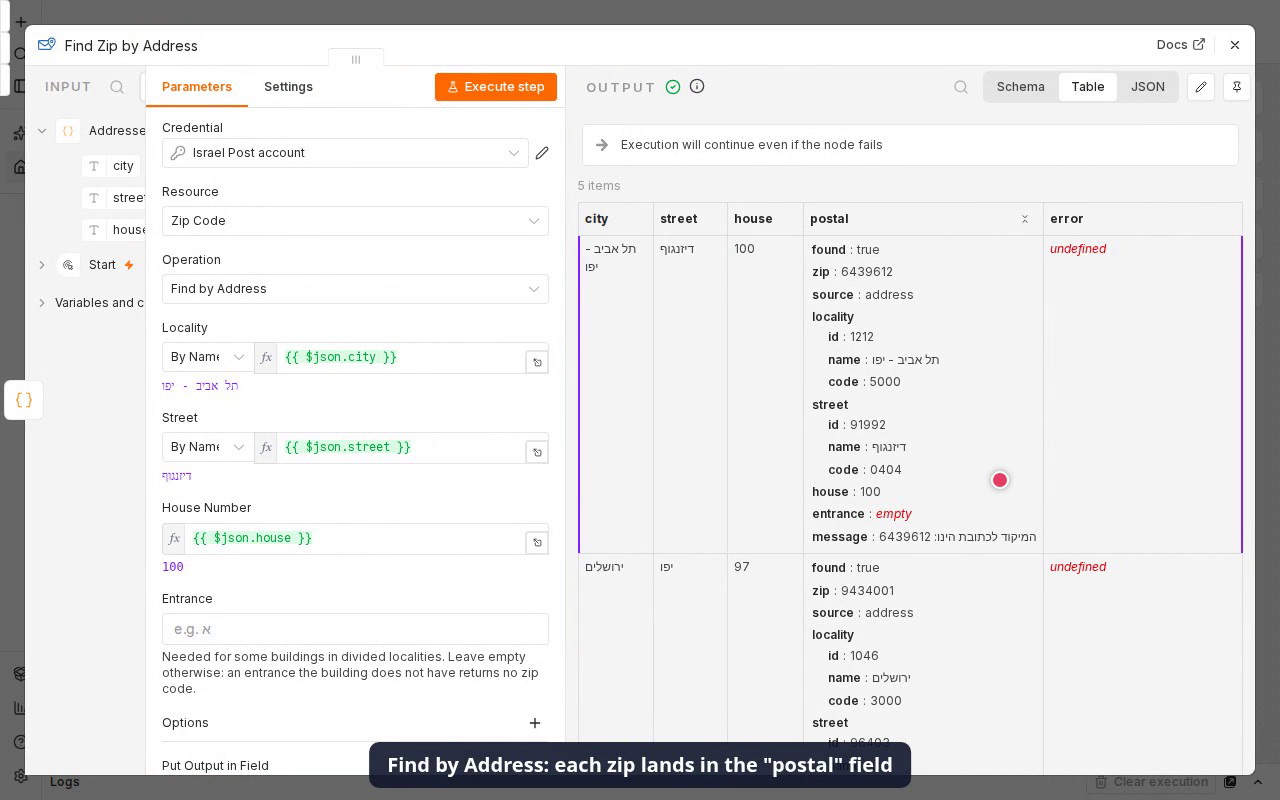
The workflow is in demo/workflow.json. It looks up five addresses
(one with an ambiguous street name, kept going by Continue On Fail) and a PO box.
> [!WARNING]
> Unofficial. This package is not affiliated with, endorsed by or supported by Israel Post.
> It calls the undocumented backend that the Israel Post website uses from the browser. There is
> no SLA, and the endpoints or the key can change or stop working without notice. Keep batch
> volumes reasonable: the node sends requests one at a time, caches lookups within an
> execution, and has a delay option for large batches.
Installation · Credentials · Operations ·
Name matching · Batches · Errors ·
Example workflows · Usage terms ·
Security notes · Development · License
Installation
In n8n (recommended): go to Settings → Community Nodes → Install, enter
@t0mer/n8n-nodes-israelpost and confirm.
Manually (self-hosted), in your n8n user folder (usually ~/.n8n):
npm install @t0mer/n8n-nodes-israelpost
Then restart n8n. See the n8n
community nodes installation guide
for details.
Credentials
Create an Israel Post API credential. The defaults work as they are:
| Field | Default | Notes |
|—|—|—|
| Subscription Key | the public key of the Israel Post website | Sent as the Ocp-Apim-Subscription-Key header |
| Base URL | https://apimftprd.israelpost.co.il/mypost-zip | Change only if Israel Post moves the API |
The key isn’t a secret: the Israel Post website ships it in its JavaScript, and every visitor’s
browser sends it. It is stored in a credential, not hard-coded, so you can replace it without
waiting for a new release if Israel Post rotates it. The credential’s Test button runs a
locality search, so it tells you right away whether the key still works.
If requests start failing with “Israel Post rejected the subscription key” (HTTP 401 or 403):
1. Open
(Network tab).
2. Look up any address.
3. Click a request to apimftprd.israelpost.co.il and copy the Ocp-Apim-Subscription-Key
request header.
4. Paste it into the credential’s Subscription Key.
Operations
| Resource | Operation | What it does |
|—|—|—|
| Zip Code | Find by Address (default) | Locality + street + house number (+ entrance) → zip code |
| Zip Code | Find by PO Box | Locality + PO box number → zip code |
| Locality | Search | Localities whose name starts with the search text |
| Street | Search | Streets of a locality whose name starts with the search text |
| Address | Find by Zip | Zip code → locality, street, house number and entrance |
The node can also be used as a tool by AI agents.
Zip Code › Find by Address
| Parameter | Notes |
|—|—|
| Locality | Required. By Name (default: what workflows usually have), From List (searchable) or By ID |
| Street | Same three modes. Leave it empty to get the zip of a locality that has a single one. |
| House Number | Required when a street is set. 1 to 4 digits: Israel Post rejects letter suffixes such as 12א. |
| Entrance | Optional (כניסה), usually a Hebrew letter. Leave it empty unless the building has entrances, because an entrance the building doesn’t have makes Israel Post return no zip. |
Input תל אביב - יפו / דיזנגוף / 100:
{
  "found": true,
  "zip": "6439612",
  "source": "address",
  "locality": { "id": "1212", "name": "תל אביב - יפו", "code": "5000" },
  "street": { "id": "91992", "name": "דיזנגוף", "code": "0404" },
  "house": "100",
  "entrance": "",
  "message": "המיקוד לכתובת הינו: 6439612"
}
source shows where the zip came from:
address: the full address.locality: the locality has a single zip. This happens when no street was given. It alsopobox: a PO box.
happens when the street wasn’t found in such a locality, and then a note explains the fallback.
code is the CBS locality or street code (סמל יישוב / סמל רחוב). In Find by Address, a locality
or street given By ID or From List has code set to null, because no name lookup was
made. Its name is null too for By ID, and the picked name for From List. (Find by PO Box fills a
By ID locality’s name from the Israel Post response, and Find by Zip always returns code: null.)
Small localities often have one zip code for the whole place. Input תל עדשים, no street:
{ "found": true, "zip": "1931500", "source": "locality", "locality": { "id": "68", "name": "תל עדשים", "code": "0103" }, "street": null, "house": "", "entrance": "", "message": null }
Zip Code › Find by PO Box
Input אלעד / 100:
{
  "found": true,
  "zip": "4081002",
  "source": "pobox",
  "locality": { "id": "929", "name": "אלעד", "code": "1309" },
  "poBox": "100",
  "message": "המיקוד עבור ת.ד 100 באלעד הינו:"
}
Locality › Search
Returns one item per locality whose name or synonym starts with Search Text:
{ id, name, synonym, code, localityZip, divided }.
localityZip is the zip of the whole locality, or null when the locality has no single zip code
(the zip depends on the street, or the locality has no zip at all).
Use Return All, or Limit (default 50).
{ "id": "68", "name": "Tel Adashim", "synonym": "Tel Adashim", "code": "0103", "localityZip": "1931500", "divided": false }
Street › Search
Takes a Locality (any mode) and a Search Text, and returns one item per street whose name or
synonym starts with it: { id, name, synonym, code, localityId }. Return All and Limit
(default 50) work as in Locality › Search. A locality given By Name must match exactly (or be the
only result of a full-name search), because this operation has no Name Matching option. A single
result found only by the first-word fallback is rejected.
Address › Find by Zip
Input 6439612 (spaces and dashes are ignored):
{
  "found": true,
  "zip": "6439612",
  "locality": { "id": "1212", "name": "תל אביב - יפו", "code": null },
  "street": { "id": "91992", "name": "דיזנגוף", "code": null },
  "house": "100",
  "entrance": "",
  "message": "תל אביב - יפו, דיזנגוף 100"
}
PO box zip codes have no street address, so Israel Post reports them as not found.
Options
| Option | Default | Operations | Meaning |
|—|—|—|—|
| Language | Hebrew | all | he (Hebrew) or en (English). Names and messages come back in this language, and names you search for are matched in it. English names can differ from a transliteration: street 91992 is Meir Dizengoff. |
| Name Matching | Exact | Find by Address / PO Box | See Name matching |
| On Not Found | Error | Find operations | Error fails the item. Return Empty outputs it with found: false and zip: null. |
| Include Raw Response | off | Find operations | Adds raw with the unmodified Israel Post results |
| Delay Between Items (Ms) | 0 | Find operations | Milliseconds to wait before each item after the first |
| Put Output in Field | empty | Find operations | Keeps the input item and puts the result under this field, e.g. postal |
Name matching
Localities and streets given By Name are looked up by prefix and then matched after
normalization. Normalization:
" ' ״ ׳ “ ”)So תל-אביב - יפו, תל אביב יפו and תל אביב - יפו all match Tel Aviv. Spelling variants are
not unified: קריית and קרית are different names.
The node searches Israel Post with the name as you typed it, then with the normalized name, and
finally with the first word only, as typed and normalized (so תל אביב העיר still reaches
תל אביב - יפו). It stops at the first search that returns results, then picks one:
1. an exact normalized match on the name or its synonym, if there is one
2. otherwise the only result, if there is exactly one, unless it came from the first-word search
3. otherwise:
– Exact (default) fails and lists the candidates, e.g.
Street "דיזנגו" is ambiguous. Candidates: דיזנגוף (id 91992), דיזנגוף סנטר (id 113842), ….
A single first-word result is reported the same way (… has no exact match. Candidates: …),
because a typo like בן יהודא shouldn’t silently become בן גוריון.
– First Result takes the top result
Use By ID (or From List) when you already know the Israel Post ID. Use Locality or
Street Search to find an ID.
Batches
and Name Matching setting). So 500 addresses in the same city send one locality lookup, one
lookup per distinct street, and one zip lookup per address. A lookup that failed with an error
is not cached, so the next item tries again. Nothing is kept between executions.
The failing item comes out as { "error": "…" }, paired with its input item.
times out after 20 s.
Errors
| Error | Meaning |
|—|—|
| Israel Post rejected the subscription key | HTTP 401 or 403: the key has changed. See Credentials. |
| Could not reach Israel Post | Network error or timeout |
| Israel Post returned HTTP … | Any other non-2xx status (after the retries for 429 / 5xx) |
| Israel Post returned an error: … | The backend answered with a non-zero ReturnCode |
| Locality "X" was not found / Street "X" was not found in locality "Y" | No name matched (follows On Not Found; Street › Search always fails) |
| Locality "X" is ambiguous. Candidates: … | Several matches, or only a first-word match (has no exact match). Use a fuller name, By ID, or Name Matching = First Result. |
| Locality "X" has no single zip code, a street is required | The locality is split by street |
| Locality "X" has no zip code | A few small localities have no zip code at all (follows On Not Found) |
| No zip code found for … | Israel Post has no zip for this input (e.g. a house number that doesn’t exist, or a wrong entrance) |
| No address found for zip code … | Address › Find by Zip: an unknown zip, or a PO box zip |
| House Number "…" is not valid / PO Box Number "…" is not valid / Zip Code "…" is not valid | Input check before any request: 1–4 digit house number, digits-only PO box, 7-digit zip |
| House Number is required when a street is set | Fill in House Number, or clear Street |
| Unexpected response from Israel Post (the site may have changed) | The backend changed. Please open an issue. |
Example workflows
Import any of these from examples/ with Workflows → Import from File, then pick
your Israel Post credential in each Israel Post node. The Google Sheets example also needs a Google
Sheets credential, and the AI Agent example an OpenAI credential. Spreadsheet IDs are placeholders;
replace them with your own.
| File | What it does |
|—|—|
| enrich-sheet-addresses-with-zip.json | Every morning, reads a Google Sheet of addresses (city, street, house, entrance), finds the zip of each row that has none, and writes the zip and a status back. |
| checkout-address-zip-webhook.json | Webhook for a checkout or sign-up form: completes a posted address with its zip code, or answers 422 when there is none. |
| reverse-zip-lookup-webhook.json | GET ?zip=6439612 returns the locality, street and house number of the zip code, in English. |
| ai-agent-zip-code-tool.json | An AI Agent that uses the node as two tools to answer “what is the zip code of …?” and “which address is this zip?” |
Usage terms and disclaimer
This is an unofficial community package. It is not affiliated with, endorsed by or supported
by Israel Post (דואר ישראל). “Israel Post” is used only to describe what the node connects to.
The zip code data and the backend belong to Israel Post. The node calls the same undocumented
endpoints as the public locate-zip page, so your use is
subject to the terms of use of the Israel Post website. Read them before you use the node in
production or for commercial purposes, and keep request volumes modest.
The package is provided as is, without warranty (see LICENSE). Check critical
addresses against the official Israel Post site.
Security notes
any other secret. Don’t paste keys into workflow parameters or expressions.
GET requests, to the credential’s Base URL (HTTPS by default). Change it onlyto an address you trust, because the key is sent there.
(customer addresses, for example) through the node.
Development
npm install
npm run build
npm run lint
npm test          # unit tests with recorded API responses, no network
npm run smoke     # opt-in: 8 live calls against the real backend
npm run smoke uses the public key by default. Set ISRAELPOST_KEY (in the environment or in a
gitignored .env) to override the key, and ISRAELPOSTBASEURL (environment only) to override
the Base URL. npm run dev starts a local n8n with
the node loaded.
docs/API.md documents the backend as verified on 2026-09-28.
CI runs lint, build, tests and the n8n community package scanner (on both the repo source and
the unpacked npm pack tarball), plus a Trivy security job, on every push to main and on pull
requests. Releases use date-based YYYY.M.PATCH versions:
pushing a tag such as 2026.9.0 publishes that version to npm with provenance. See CHANGELOG.md.
Contributing
Issues and pull requests are welcome at
github.com/t0mer/n8n-nodes-israelpost.
If Israel Post changes its backend, an issue with the failing input and the error message helps
the most. Please run npm run lint and npm test before you open a pull request.