Description


n8n-nodes-sendzen
This is an n8n community node for integrating SendZen with your workflows.
SendZen provides an API on top of the official WhatsApp Cloud API, so you can send messages (session + templates) and receive inbound WhatsApp messages via webhooks.
- Website: https://www.sendzen.io
- Docs: https://sendzen.io/docs
- Overview
- Installation
- Authentication
- Features
- How to Use the SendZen Action Node
- How to Use the SendZen Trigger Node
- Common Use Cases
- Best Practices
- Troubleshooting
- Compatibility
- Resources
- Running Locally
- Contributing
- Support
- License
- Send session messages (within 24-hour customer care window)
- Send template messages (for business-initiated conversations)
- Mark messages as read
- Show typing indicator
- Receive inbound messages via webhook trigger
- This node sends message content, recipient phone numbers, template names, and template variables to SendZen to deliver WhatsApp messages.
- Store your SendZen API key only in n8n Credentials.
- For inbound messages, enable webhook signature verification (recommended) to prevent spoofed requests.
- Send Session Message
- Send Template Message
- Mark as Read
- Show Typing Indicator
- Receive inbound WhatsApp messages in real time via webhook
- Outputs full message payload (text, media, location, contacts)
- Simple webhook setup: copy URL from node → paste in SendZen dashboard
- A SendZen account
- A connected WhatsApp Business Account (WABA) in SendZen
- Access to n8n
- A SendZen account
- A connected WABA phone number
- Access to n8n
X-Hub-Signature-256: sha256=- Lead capture + instant reply: Trigger on inbound message, capture details, respond with next steps
- Order updates: Trigger on order status change, send template message
- Appointment reminders: Scheduled trigger, send template reminders
- Support automation: Trigger on inbound support message, route based on keywords, reply
- Payment reminders: Trigger from billing system, send WhatsApp template
- Use template messages to start conversations (business-initiated).
- Use session messages only within the active 24-hour window.
- Keep API keys only inside n8n Credentials.
- For production workflows, log failures and add retries (for example using IF + Wait + Retry patterns).
- When using templates, prefer mapping variables explicitly so workflows remain readable.
- 401 / auth error: Re-check API key and credential selected in the node
- No WABA accounts listed: Confirm WABA is connected inside SendZen
- Trigger not firing:
- Template missing: Ensure template exists and is approved in your WhatsApp Business Manager
- n8n: 1.0.0+ (tested on 1.89.2+)
- Node.js: >= 18.10
- SendZen Documentation: https://sendzen.io/docs
- WhatsApp Cloud API Reference: https://developers.facebook.com/docs/whatsapp
- n8n Community Nodes: https://docs.n8n.io/integrations/community-nodes/
- Robustness: Added comprehensive Jest test suite for Triggers, Actions, and Template Builders.
- Optimization: Reduced package size by excluding development files.
- Initial release
- Support for Session Messages, Templates, Mark as Read, Typing Indicators.
- Webhook Trigger support.
- Auto-discovery for WABA Accounts and Templates.
- Email: milan@sendzen.io
- Issues: use GitHub Issues in this repository
—
Table of Contents
—
Overview
SendZen helps developers and software platforms use WhatsApp reliably without dealing with all the Meta Cloud API complexity directly.
With this n8n node, you can:
—
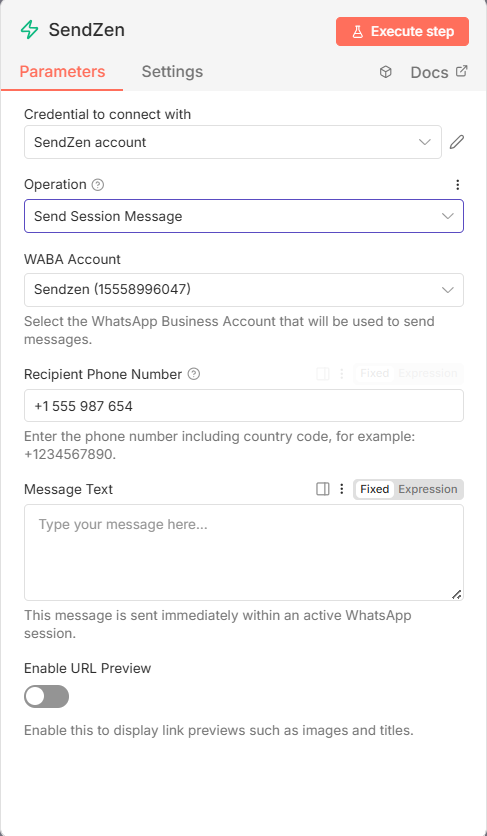
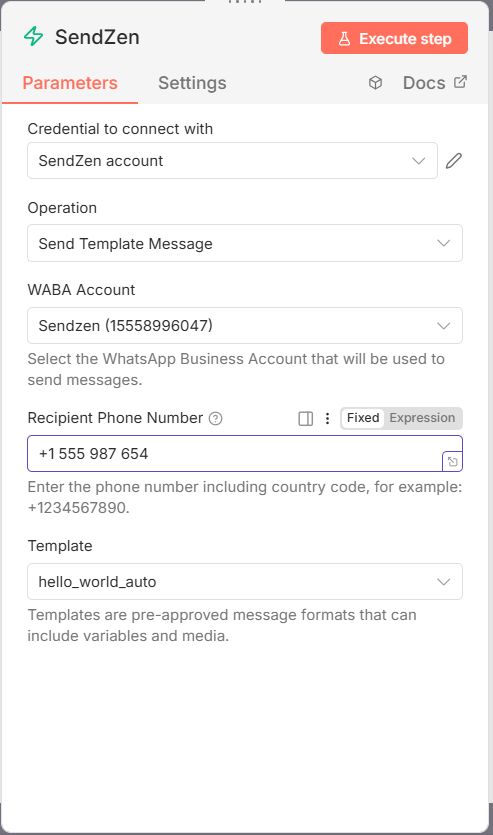
Screenshots
Send Session Message
!SendZen Send Session Message Node in n8n
Send Template Message
!SendZen Send Template Message Node in n8n
—
Installation
Follow the installation guide in the n8n community nodes documentation.
—
Authentication
To use this node, you need a SendZen API Key.
1. Sign up at https://www.sendzen.io
2. Go to your dashboard and generate an API key (Dashboard → API Keys)
3. Connect your WhatsApp Business Account (WABA) inside SendZen (required to send messages)
> Note: Keep your API key secure and never commit it to code or share it publicly.
—
Data & Security Notes
—
Features
SendZen Action Node
– Send free-form text messages within the active 24-hour window
– Supports URL previews and E.164 validation
– Send pre-approved templates to start conversations
– Dynamic template + variable mapping (body, header, buttons)
– Supports media headers (image, video, document, audio)
– Supports CTA and quick reply buttons
– Mark inbound messages as read (useful for UX and analytics)
– Auto-detects message identifiers when connected from the trigger
– Show “Typing…” to make automations feel more natural
SendZen Trigger Node
—
How to Use the SendZen Action Node
Prerequisites
Setup Process
1. Create your SendZen API key
– Open SendZen dashboard
– Go to API Keys
– Copy the key and store it securely
2. Connect your WABA
– Complete the WABA connection flow in SendZen
– Ensure at least one phone number is connected and active
Integration Steps (n8n)
1. Create a new workflow in n8n
2. Add any trigger (Webhook, Schedule, CRM trigger, etc.)
3. Add SendZen node
4. In SendZen node:
– Select Credentials → Create New
– Choose SendZen API
– Paste your API key
– Save
5. Choose an operation and fill required fields
6. Click Test Step
7. Save and activate your workflow
—
How to Use the SendZen Trigger Node
Prerequisites
Webhook signature verification (HMAC-SHA256) — recommended
SendZen signs every webhook payload using HMAC-SHA256 and includes the signature in the X-Hub-Signature-256 header in this format:
To enable signature verification in n8n:
1. In the SendZen dashboard webhook settings, set a Secret Key (recommended).
2. In n8n, create credentials:
– Credentials type: SendZen Webhook API
– Set Secret Key to the same value you configured in SendZen.
3. In the SendZen Trigger node, select those SendZen Webhook API credentials.
If credentials are set, the trigger will return 401 for missing/invalid signatures.
Important: signature verification requires hashing the raw request body. Avoid any middleware/proxies that reformat/pretty-print the JSON payload. If you run n8n behind Cloudflare / nginx / API gateway, ensure it does not modify request body (no pretty-print, no re-encoding)
Setup Process
1. Get your webhook URL from n8n
– Add SendZen Trigger node in your workflow
– At the top of the node, find Webhook URLs
– Copy the Production URL
Tip: Use the Test URL while testing in the editor. After activating the workflow, set the Production URL in SendZen for live traffic.
2. Add webhook URL in SendZen
– Open SendZen dashboard webhook settings
– Paste the Production URL
– Save changes
3. Test and activate
– In n8n, click Test Step
– Send a WhatsApp message to your connected number to verify the trigger fires
– Save workflow and toggle Active
—
Common Use Cases
### Example 1: New lead → WhatsApp template
Trigger: CRM/New form submission → Send Template Message → Log result.
### Example 2: Inbound WhatsApp → Auto-reply + CRM
SendZen Trigger → IF keyword contains “pricing” → Send Session Message → Create lead in CRM.
—
Best Practices
—
Troubleshooting
– Ensure webhook URL is saved in SendZen
– Confirm the URL is publicly reachable
– Confirm workflow is active in n8n
—
Compatibility
—
Resources
—
Version history
1.0.1
1.0.0
—
Running Locally
If you want to contribute or modify this node:
1. Clone: git clone https://github.com/sendzen-io/n8n-nodes-sendzen.git
2. Install: pnpm install
3. Build: pnpm build
4. Test: pnpm test (Runs the Jest test suite)
5. Link: Follow the n8n custom node guide to link dist to your local n8n instance.
—
Contributing
We welcome contributions! Please follow these steps:
1. Fork the repository.
2. Create a feature branch.
3. Run Tests: Ensure pnpm test passes.
4. Submit a Pull Request.
Support
—