Description
n8n-nodes-formstep

Formstep nodes for n8n. Send a customer a branded form made for them, prefilled with what you already know, pause the workflow until they answer, and carry on with verified answers keyed by stable field keys.
What you can build
Each use case has a step-by-step guide and a workflow you can import from examples/.
| Use case | Guide | Workflow |
| — | — | — |
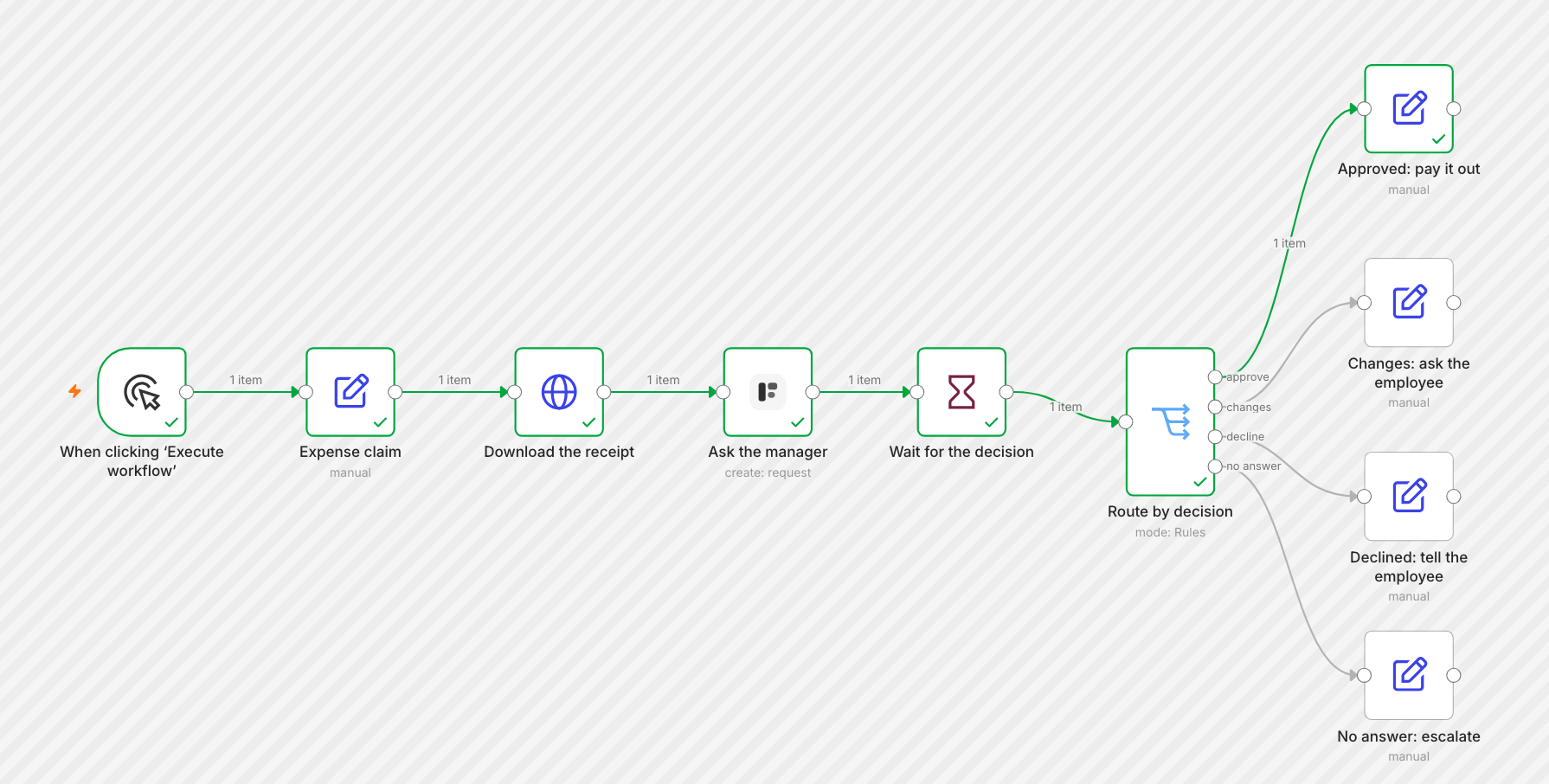
| A manager approves an expense, with the receipt attached | Get a manager’s approval | formstep-expense-approval.json |
| AI reads an invoice PDF, the supplier confirms or corrects it | Read a PDF with AI and have the sender confirm it | formstep-invoice-ai-confirm.json |
| Ask for the documents each case needs, then file every upload | Collect the documents each case needs | formstep-claim-documents.json |
| An AI agent sends, checks and chases requests | Let an AI agent send requests | formstep-ai-agent-onboarding.json |
| Send a request and act on the outcome | Send a request, Act on the outcome | formstep-request-wait.json, formstep-request-new-form.json |
| Start a workflow when someone submits a form’s public link | Public link submissions | formstep-submission.json |
Import one with Workflows › Import from File, then pick your credential and your form. The examples create test requests, so a first run emails nobody.
Install
On self-hosted n8n, open Settings › Community Nodes, select Install and enter n8n-nodes-formstep. On n8n Cloud, the node can be installed once n8n has verified it.
You need n8n 2.30 or newer, and an n8n that Formstep can reach over HTTPS: set WEBHOOKURL and N8NEDITORBASEURL to its public address. To use the node as an AI agent tool, start n8n with N8NCOMMUNITYPACKAGESALLOWTOOL_USAGE=true. See Install the Formstep node in n8n.
Connect
Create a Formstep OAuth2 API credential, select Connect my account, sign in to Formstep and pick the workspace n8n may use. There is no key to copy: n8n registers itself with Formstep, and the connection refreshes itself while you use it at least once every 30 days. See Connect Formstep to n8n.
Nodes
Formstep works on requests. A request asks one recipient to complete a form; the node is also usable as an AI agent tool.
| Operation | What it does |
| — | — |
| Create | Sends a request for a published form, or for a new form built from blocks in the same call. Prefills and locks fields, fills hidden context fields, attaches documents, emails the link, sets reminders and an expiry. Wait for the Outcome pauses the workflow until the recipient answers. |
| Get | Reads one request: status, outcome and, once completed, the answers. |
| Get Many | Lists the requests of a form or the workspace, filtered by status, outcome or External ID. |
| Cancel | Withdraws a pending request, with a reason. |
| Remind | Emails the recipient a reminder now. |
| Replay Callback | Sends the callback of a finished request again. |
Formstep Trigger starts a workflow on an event of one form: Request Completed, Request Expired, Request Canceled, and Public Link Submission Created, Updated or Abandoned. It registers its webhook with Formstep when you publish the workflow, removes it when you unpublish, and checks the X-Formstep-Signature of every delivery.
Good to know
- Test Mode on Create sends nothing and keeps the request out of your lists. The request still opens and completes, and its callback still resumes a waiting workflow; request triggers ignore it.
- External ID is also the request’s idempotency key: a retried execution gets the same request back with
deduplicated: trueinstead of a second one. - Answers arrive under their field keys, as
{{ $json.data.answers.companyname }}in a trigger and{{ $json.body.data.answers.companyname }}after a Wait node, with the readable text underdisplay. The outcome of a Decision question isdata.request.outcome:approve,changesordecline. See the webhooks reference. - Get and Get Many return ten fields per request with Simplify, on by default from node version 3, with ISO 8601 dates. Turned off, they return the whole request, with Unix-millisecond timestamps.
- A failed call stops the node with the Formstep code and message, such as
VALIDATION_ERROR: "email" is not a valid email address, with the reason and the field in the description. With Continue on Fail, the same text is in the item’serror. - Workflows saved with node version 1 or 2 keep working unchanged. New nodes are version 3.
- n8n guides
- Creating requests: prefill, locked fields, context, documents, test mode
- Create a form and a request in one call: every block of a new form
- Field keys and the REST API
Resources
Changelog and development
What changed in each version is in the changelog. To build, test, run the node locally against Formstep or release a version, see CONTRIBUTING.md.