Description
n8n-nodes-calcslive

!n8n community node

Plug-and-Play Unit-Aware Multi-Step Calculations to your n8n
CalcsLive calculations feature unit-awareness physical quantities and unit agnostic symbolic equations to enable you to THINK in Physics without distraction in handling units. @calcslive/n8n-nodes-calcslive brings in the power and elegance to your n8n ecosystem.
Specifically for AI integration, it empowers AI agents with calculation accuracy and automatic handling of 570+ units across 67+ categories.
> ✅ Now Listed in n8n Community Directory! Install directly from n8n’s Community Nodes. We’re actively improving the node and welcome your feedback! Share your thoughts or reach out at don.wen@calcslive.com
🚀 Quick Start
Installation
1. Open your n8n instance
2. Go to Settings → Community Nodes
3. Enter @calcslive/n8n-nodes-calcslive and click Install
4. Create your CalcsLive API credentials with your API key for ‘n8n Integration’
First Calculation (5 minutes)
1. Create a simple calculation at CalcsLive and note the Article ID
2. Add the CalcsLive Calculator node to your workflow
3. Enter your Article ID and choose Enhanced Mode for guided setup
4. Add input values and watch the unit-aware magic happen! 🎯
💡 Pro Tip: Start with a simple unit conversion calc (see example below) to experience the power!
📸 Demo Workflow
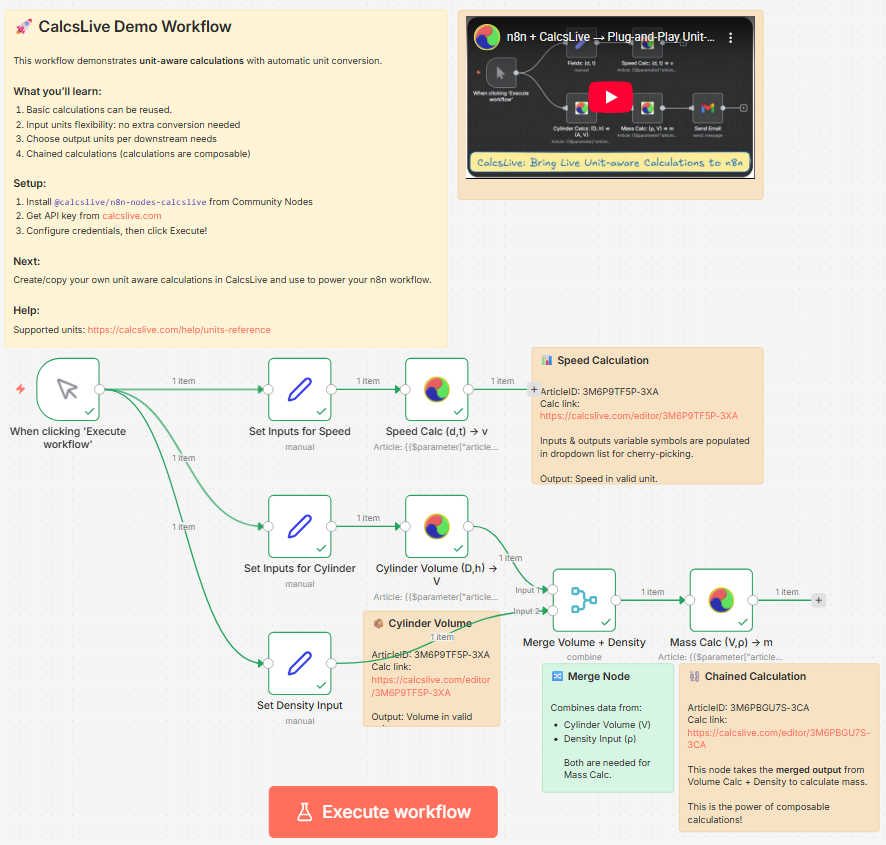
Example n8n workflow showing CalcsLive nodes performing unit-aware calculations: speed calculation, cylinder volume, and chained mass calculation using a Merge node to combine volume output with density input.
🎥 Video Demonstration
Watch the Complete Demo on YouTube →
“n8n + CalcsLive → Plug-and-Play Unit-Aware Calculations”
This video walkthrough demonstrates:
- 🚀 Installation and setup in n8n
- 🎯 Creating CalcsLive calculations from scratch
- 🔗 Building unit-aware workflow integrations
- ⚡ Real-time calculation chaining between nodes
- 📊 Handling complex multi-step engineering calculations
- Calc1 outputs volume → Calc2 uses that volume as input
- n8n expressions seamlessly bridge:
{{$json.volume_result}} - One mass calc works with ANY volume calculation
- Cylinder volume + Mass calc = Cylinder mass
- Box volume + Mass calc = Box mass
- Sphere volume + Mass calc = Sphere mass
- Dynamic Values:
{{$json.temperature}}→ Automatic °C to °F conversion - Smart Bridging: Any node → CalcsLive → Any node with proper units
- Zero Code: No manual conversion formulas or complex calculations needed
Supporting Calculations
The demo workflow uses these CalcsLive calculations:
| Calculation | Article ID | Description |
|————-|———|————-|
| Speed Calculator (Link) | 3M6P9TF5P-3XA | Distance/time → speed with unit conversion |
| Cylinder Volume (Link) | 3M6P9TF5P-3XA | Diameter/height → volume calculation |
| Mass Calculator (Link) | 3M6PBGU7S-3CA | Volume + Density → Mass (chained calculation) |
🧩 Why Separate Calculations? The Composability Advantage
Question: Why create a separate mass calculator when the first calculation already includes mass calculation?
Answer: This demonstrates CalcsLive’s composable architecture – a key design principle that unlocks powerful workflow patterns:
🔗 Calculation Chaining:
♻️ Reusability at Scale:
🎯 Result: Instead of creating separate mass calculations for every shape, you build modular, reusable calculation components that combine in endless ways. This is the power of composable engineering in n8n workflows!
📥 Import Ready-to-Use Template
Want to try this workflow instantly? Download and import our template:
📥 Download Demo Workflow (Right-click → Save As)
Import Instructions:
1. In n8n: Workflows → Import from File
2. Upload n8n-template-submission.json
3. Set up credentials (you’ll be prompted):
– CalcsLive API: Add your API key from CalcsLive Account
4. Execute and watch the unit-aware magic! ✨
The template includes a Merge node that combines Volume calculation output with Density input, demonstrating how to chain calculations that require data from multiple sources.
✨ Why CalcsLive? The Plug-and-Play Revolution!
🔌 Plug-and-Play Power
CalcsLive transforms n8n workflows with zero-configuration unit awareness. Simply plug the CalcsLive node between any two nodes and instantly bridge different unit systems, calculations, or data formats.
🚀 n8n Expressions + Unit Awareness = Game Changer
When you use n8n expressions ({{$json.data}}) with CalcsLive, your workflow data becomes unit-aware:
Before vs After Comparison
// ❌ Before: Manual unit conversion nightmare
const distanceKm = 150;
const timeHours = 2;
const speedKmH = distanceKm / timeHours; // = 75 km/h
// Need mph? Write more conversion code...
const speedMph = speedKmH * 0.621371; // = 46.6 mph
// ✅ With CalcsLive: Plug-and-play unit-aware workflows
{
  "inputs": {
    "D": { "value": "{{$json.distance}}", "unit": "km" },
    "t": { "value": "{{$json.time}}", "unit": "h" }
  },
  "outputs": {
    "s": { "unit": "mph" }
  }
}
// Result: Perfect unit conversion with n8n expression data! 🎯
🎯 Real-World Use Cases
🔌 Plug-and-Play Benefits for n8n Ecosystem
🎯 Instant Unit Bridging: Drop CalcsLive between any nodes to bridge unit mismatches
🚀 Zero Configuration: No complex setup, just plug and play
⚡ Workflow Superpowers: Transform ordinary workflows into unit-aware automation
🔧 Configuration Modes
Enhanced Mode (Recommended) 🌟
User-friendly interface with:
Legacy Mode (Advanced Users)
Direct JSON input for:
📋 Step-by-Step Guide
Step 1: Get Your API Key
1. Visit CalcsLive and create an account
2. Go to Account → API Keys
3. Generate a new API key for n8n integration
4. Note your subscription tier limits (Free: 100 calls/month after trial)
> 📦 npm Package: @calcslive/n8n-nodes-calcslive
Step 2: Configure Credentials
1. In n8n: Credentials → Create New → CalcsLive API
2. Enter your API key from Step 1
3. Base URL: https://www.calcslive.com (default)
Step 3: Create Your Calculation Articles
Security Note: CalcsLive’s n8n integration API is designed so users can only use their own public calculation articles in the CalcsLive node. You can create your own articles and use them in your node easily following the examples.
1. Visit CalcsLive and create your calculation
2. Define your Physical Quantities (PQs) and mathematical relationships
3. Save your calculation and find the Article ID in the URL
– Example URL: https://www.calcslive.com/editor/3M5NVUCGW-3TA
– Article ID: 3M5NVUCGW-3TA (the part after /editor/)
Demo Article IDs (for reference only – create your own for actual use):
3M6P9TF5P-3XA – Speed & Cylinder Volume Calculator3M6PBGU7S-3CA – Mass Calculator (Volume × Density)Step 4: Configure Your Node
#### Enhanced Mode Setup:
1. Article ID: Enter your chosen calculation ID
2. Input Physical Quantities: Click “Add Input PQ”
– Select parameter from dropdown
– Enter value (or use expression)
– Specify unit (optional – uses article default)
3. Output Physical Quantities: Click “Add Output PQ”
– Select desired output parameter
– Specify preferred unit for results
#### Legacy Mode Setup:
{
  "articleId": "3M5NVUCGW-3TA",
  "inputs": {
    "D": { "value": 150, "unit": "km" },
    "t": { "value": 2, "unit": "h" }
  },
  "outputs": {
    "s": { "unit": "mph" }
  }
}
#### Note
For input PQs and output PQs in your article, when they are not used in your node, input values and units in the article will be used to perform the calculations for your node.
It is recommended to include all input and out PQs available from the article in your node, to allow flexibility in use for both upstream and downstream nodes.
💡 Workflow Examples
Example 1: Simple Unit Conversion (Perfect for Getting Started!)
Step 1: Create a calc in CalcsLive frontend with 2 PQs:
PQ0 = 2 m (input quantity) PQ1 = PQ0 cm (output – just unit conversion)Step 2: Use in n8n workflow as a plug-and-play unit converter:
Data Source → CalcsLive Calculator → Next Node
{
  "articleId": "YOUR-ARTICLE-ID",
  "inputs": {
    "PQ0": { "value": "{{$json.length_meters}}", "unit": "m" }
  },
  "outputs": {
    "PQ1": { "unit": "cm" }
  }
}
🎯 Result: Automatic m → cm conversion! Refer to Interactive Units Database for all units and categories CalcsLive support. The CalcsLive node becomes a unit-aware bridge between any two nodes in your workflow.
Example 2: IoT Sensor Processing with n8n Expressions
IoT Sensor → CalcsLive Calculator → Database
🚀 Game-Changer: When you use n8n expressions (like {{$json.temperature}}) with CalcsLive, your data gets unit-awareness superpowers!
{
  "inputs": {
    "temp_c": { "value": "{{$json.temperature}}", "unit": "°C" }
  },
  "outputs": {
    "temp_f": { "unit": "°F" }
  }
}
Example 3: Batch Spreadsheet Processing
Google Sheets → CalcsLive Calculator → Email Report
Use Case: Process engineering data with n8n expressions passing spreadsheet values directly to unit-aware calculations
Example 4: Real-time Monitoring Dashboard
Webhook → CalcsLive Calculator → InfluxDB → Grafana
Use Case: Monitor manufacturing equipment with unit-normalized metrics using dynamic n8n expressions
Example 5: Compliance Reporting
Database Query → CalcsLive Calculator → PDF Generator → Email
Use Case: Generate regulatory reports with region-appropriate units
📊 Understanding Node Output
Success Response Structure
{
  "success": true,
  "articleId": "3M5NVUCGW-3TA",
  "inputs": {
    "D": {
      "symbol": "D",
      "value": 150,
      "unit": "km",
      "baseValue": 150000,
      "baseUnit": "m",
      "description": "Distance"
    }
  },
  "outputs": {
    "s": {
      "symbol": "s",
      "value": 46.6,
      "unit": "mph",
      "baseValue": 20.83,
      "baseUnit": "m/s",
      "expression": "D/t",
      "description": "Speed"
    }
  },
  "_metadata": {
    "executionTime": "2025-09-03T17:30:00.000Z",
    "processingTimeMs": 45
  }
}
Key Output Fields
value & unit: Your requested result with specified unitsexpression: Mathematical formula used for calculationdescription: Human-readable parameter description🚨 Error Handling & Troubleshooting
Common Error Messages
| Error Code | Message | Solution |
|————|———|———-|
| 401 | Invalid API Key | Check your CalcsLive API credentials |
| 404 | Article Not Found | Verify article ID exists and is public |
| 400 | Invalid Input Format | Check JSON structure and unit syntax |
| 429 | Rate Limit Exceeded | Wait or upgrade subscription tier |
| 500 | Server Error | Temporary CalcsLive service issue |
Best Practices
Debugging Tips
1. Enable Node Debugging: Check console logs for detailed request/response info
2. Test Articles: Use demo article IDs for initial testing
3. Unit Checking: Verify unit spelling – case sensitive! (km not KM)
4. Expression Validation: Check that symbols match article definitions
🔧 Advanced Configuration
Dynamic Parameters with Expressions
{
  "inputs": {
    "pressure": {
      "value": "{{$json.sensor_pressure}}",
      "unit": "{{$json.sensor_unit || 'Pa'}}"
    }
  }
}
Conditional Output Units
{
  "outputs": {
    "temperature": {
      "unit": "{{$json.region === 'US' ? '°F' : '°C'}}"
    }
  }
}
Batch Processing Pattern
// Split incoming array → CalcsLive Calculator → Merge results
🌍 Units & Categories
CalcsLive supports 67+ unit categories with 570+ units!
📖 Complete Reference: Visit CalcsLive Units Reference for the interactive browser with search functionality and complete unit listings.
📚 API Reference
Node Parameters
| Parameter | Type | Required | Description |
|———–|——|———-|————-|
| articleId | string | ✅ | CalcsLive calculation article identifier |
| configMode | enum | ✅ | “enhanced” or “legacy” configuration mode |
| inputPQs | array | 📋 | Enhanced mode: Physical quantity inputs |
| outputPQs | array | ⚪ | Enhanced mode: Desired outputs with units |
| inputs | JSON | 📋 | Legacy mode: Direct JSON input structure |
| outputs | JSON | ⚪ | Legacy mode: Direct JSON output specification |
Legend: ✅ Required, 📋 Required in respective mode, ⚪ Optional
Input PQ Structure (Enhanced Mode)
{
  "symbol": "D",          // Parameter symbol from article
  "value": 150,           // Numeric value
  "unit": "km"            // Unit specification (optional)
}
Output PQ Structure (Enhanced Mode)
{
  "symbol": "s",          // Output parameter symbol
  "unit": "mph"           // Desired output unit
}
🔗 Integration Examples
Google Sheets Integration
Google Sheets Trigger → CalcsLive Calculator → Google Sheets Update
Process engineering data with automatic unit normalization.
Discord/Slack Bot
Discord Trigger → CalcsLive Calculator → Discord Response
Create calculation bots for engineering teams.
Database ETL Pipeline
Database → CalcsLive Calculator → Transform → Data Warehouse
Standardize units across diverse data sources.
Monitoring & Alerting
Sensor API → CalcsLive Calculator → Condition → Email Alert
Calculate safety thresholds with proper unit handling.
🆘 Support & Community
🤝 Contributing
We welcome contributions! Here’s how to get involved:
1. Fork the repository
2. Create a feature branch (git checkout -b feature/amazing-feature)
3. Commit your changes (git commit -m 'Add amazing feature')
4. Push to the branch (git push origin feature/amazing-feature)
5. Open a Pull Request
Development Setup
git clone https://github.com/calcslive/n8n-nodes-calcslive.git
cd n8n-nodes-calcslive
npm install
npm run build
npm linkIn your n8n directory
npm link n8n-nodes-calcslive
n8n start
📋 Version History
0.1.15 – n8n Community Compliance
authenticate methodhttpRequestWithAuthentication for secure API callspairedItem for proper n8n item linkingcontinueOnFail support0.1.0 – MVP Release
Roadmap
📜 License
MIT License – see LICENSE file for details.
🌟 About CalcsLive
CalcsLive transforms how engineers and technical professionals handle calculations by embedding unit-aware mathematics directly into documents and workflows. Founded on the principle that calculations should be as easy as writing text, CalcsLive bridges the gap between mathematical rigor and practical usability.
Visit CalcsLive to explore the full platform!
—
Made with ❤️ by the CalcsLive team. Empowering engineers through intelligent calculations.