
Description




An n8n community node for Smart Sprint Planner, a YouTrack app for sprints that span several functional roles. Read the working sprint and its issues by role, history, capacity, calendar and absences, releases and reminders; write sprint items, absences and releases; search YouTrack issues and set their fields — from any workflow, or hand the node to an AI Agent as a tool.
The node talks to the planner’s external REST in YouTrack with a permanent token, so it has exactly the permissions of the token’s user in YouTrack and in the planner’s role groups.
What it looks like
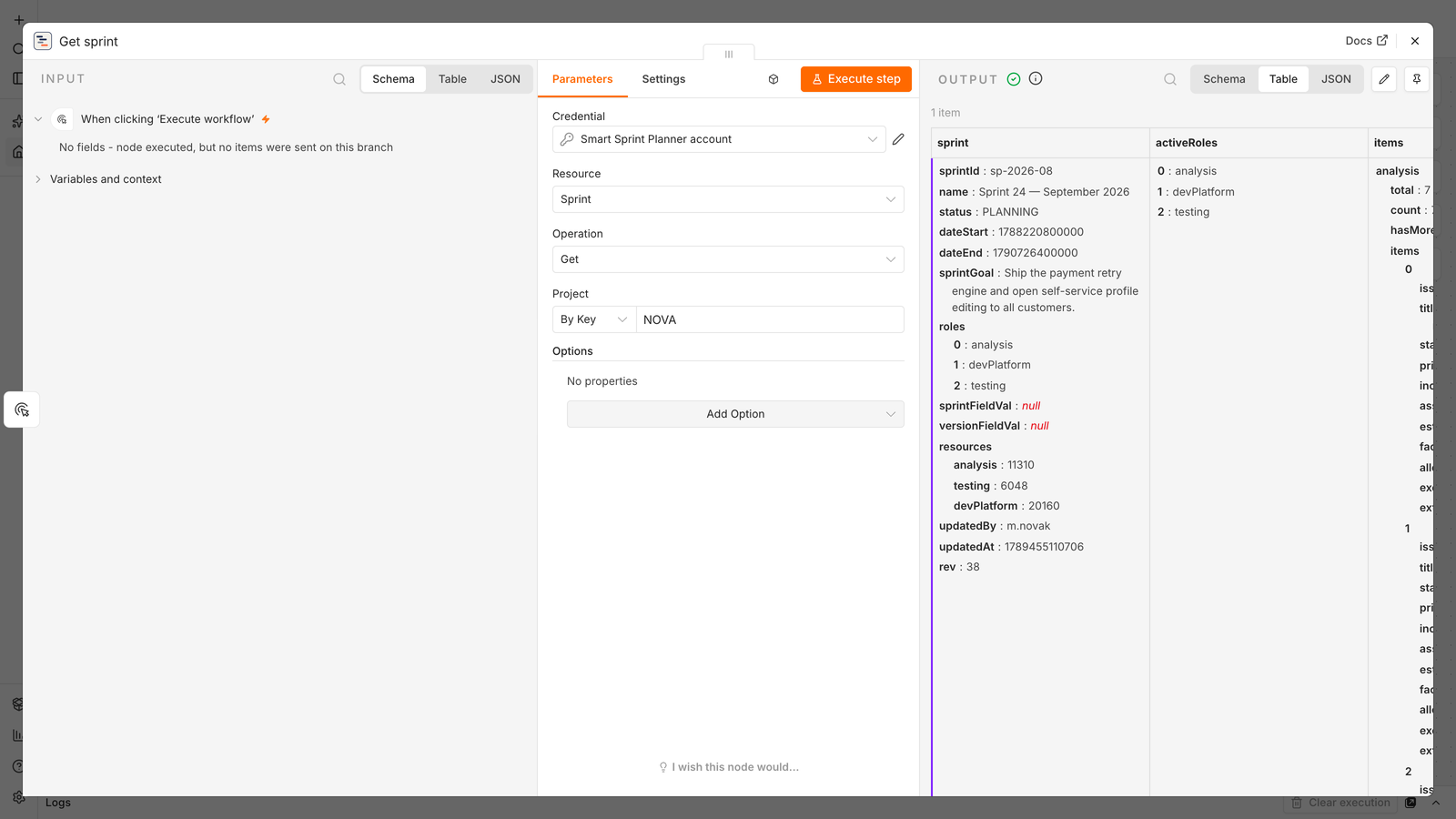
Sprint → Get on a demo project: the working sprint with its goal, roles, resources and issues by role.
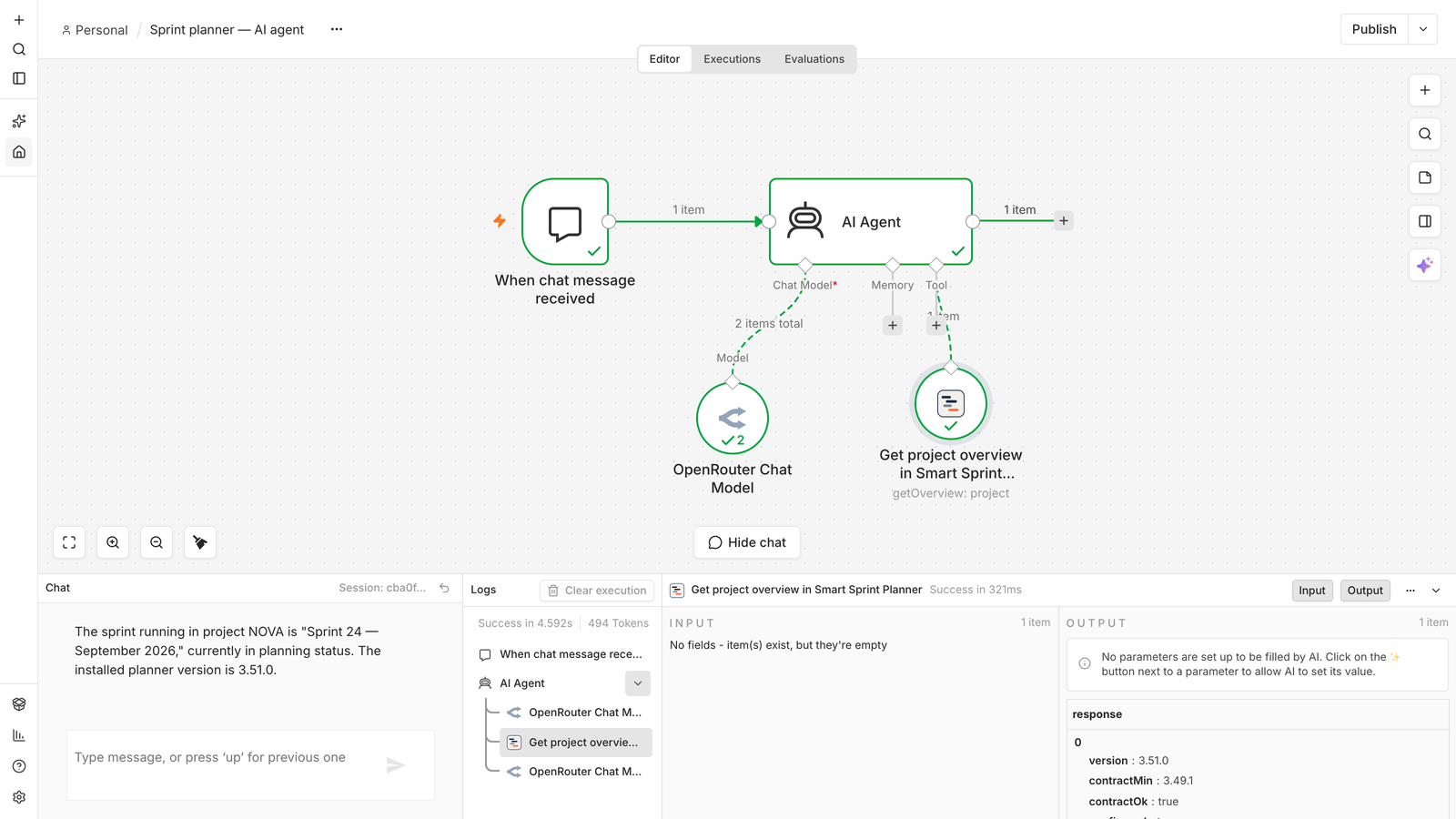
AI Agent tool: the agent answers from the planner’s data — the log on the right shows the node’s call and its response.
Part of Smart Sprint Planner
| | |
|—|—|
| Smart Sprint Planner | the YouTrack app itself — source, releases, changelog |
| JetBrains Marketplace | install the planner into YouTrack |
| Integrations guide | the external REST contract, roles and refusal codes (на русском) |
| MCP server | the same operations for AI agents outside n8n |
Requirements
- n8n 2.x (tested on 2.37).
- Smart Sprint Planner 3.49.1 or later; Access → Get My Roles and Release → Delete need 3.51.0 (an older planner answers “Requires planner 3.51.0 or later”).
- A YouTrack user with a permanent token and the planner roles the scenario needs.
- Self-hosted n8n, from the UI: Settings → Community Nodes → Install, package name
n8n-nodes-smart-sprint-planner. - Self-hosted n8n, manually:
npm install n8n-nodes-smart-sprint-plannerin the n8n nodes folder (~/.n8n/nodes), then restart n8n. - Units follow the contract: effort and resources are minutes (8 h = 480); sprint and release dates are points in time; absence dates are calendar days without a time-zone shift.
- Revisions: without the Revision option the node reads the data revision itself and remembers it between the items of one run (ten issues — one read); on a conflict it retries a point write exactly once. Upload Draft never retries and never writes over an occupied slot unless Overwrite is on.
- Write to one project sequentially and re-read the data after a series of writes: strictly simultaneous writes to one project may lose changes (a YouTrack property).
- Continue On Fail: instead of stopping, the failed item becomes
{ ok: false, kind, reason, message, hint, action, cid };cidis the number to look up in the planner log. - Set Field writes one field per call with the token user’s permissions; the node takes the field kind from the issue itself. Multi-value fields are not written in 0.1.x — use a command of the YouTrack node. Set Field via Planner writes only the fields from the planner settings and only with a planner role (a restricted contract operation).
- AI Agent tool: the node can be attached to an n8n AI Agent (Tools). On n8n 2.37 the AI Agent node version 2.2 passes the node’s answer to the model; version 3.1 gave the model an empty answer from this node and from the built-in Date & Time tool alike, which is n8n behavior. If the agent “does not see” the data, check the AI Agent node version.
- Upload a sprint draft: Schedule Trigger → Code (build the header and
{ "analysis": [ { "issueId": "DEMO-101", "estimate": 480 } ] }) → Sprint → Upload Draft. An occupied slot returns the refusalslot_occupiedinstead of overwriting someone else’s work. - Found issues into the sprint: Issue → Search (
#Unresolved tag: next-sprint) → Sprint Item → Create or Update for each item (role, issue ID from the expression, estimate). - Run a release: Release → Create or Update (status
planned) → Release → Update Issues → Release → Set Status (prep→work→released). - Check before writing: Project → Get Planner Status and Access → Get My Roles first; if the needed role is missing, stop instead of learning it from a write refusal.
- The HTTP Request node against the OpenAPI contract
openapi-sprint.yaml. - The MCP Client node against YouTrack’s built-in MCP server with the planner’s tools (planner 3.50.0+, YouTrack 2025.3+), or the standalone MCP server.
Installation
After installation restart n8n: a new credential type is picked up only at start.
Credentials
Credential type Smart Sprint Planner API:
| Field | What to enter |
|—|—|
| YouTrack URL | Base address without /api at the end, e.g. https://youtrack.example.com |
| Permanent Token | Created in the YouTrack user profile (Account Security → New token). The node gets exactly this user’s permissions |
| Application ID | smart-sprint-planner; change only if the planner is installed under a different ID |
The credential test calls the planner’s app-version. For automation, issue the token for a dedicated service user and give it only the planner roles the scenario needs.
Operations
26 operations; input items are processed strictly one after another.
| Resource | Operations |
|—|—|
| Project | Get Overview · Get Many (YouTrack projects marked with whether the planner is attached) · Get Planner Status |
| Sprint | Get · Upload Draft · Update (header) |
| Sprint Item | Create or Update · Remove · Assign |
| History | Get Many |
| Capacity | Get · Create or Update Member |
| Calendar | Get |
| Absence | Get Many · Create or Update · Delete |
| Release | Get Many · Create or Update · Set Status · Update Issues · Delete (3.51.0) |
| Reminder | Get Many |
| Access | Get My Roles (3.51.0) |
| Issue | Search · Set Field (standard YouTrack REST) · Set Field via Planner |
How the node behaves
Example workflows
Alternatives
Development
npm ci --ignore-scripts
npm run check-shared   # shared layer = MCP server (../mcp-server/src), hints = ../error-codes.notes.json
npm run lint           # n8n linter, strict mode
npm test               # build + node --test over dist/
nodes/SprintPlanner/shared/ holds byte copies of the MCP server’s constants, errors, ops, shape and the hints in the build language; change them only in the server, then run npm run sync-shared.nodes/SprintPlanner/actions//.operation.ts ; network calls only in nodes/SprintPlanner/transport/.tests/smoke-n8n.mjs runs the node on a local n8n against a test YouTrack (environment variables are listed in the file header); tests/scan-source.mjs runs the n8n source scanner.Integrations/n8n-node) and mirrored to this repository for publishing; npm run check-shared works only inside the planner repository, where the MCP server sources live.publish.yml GitHub workflow of this repository on a vX.Y.Z tag.License
MIT © Letsrollamigo

